The Daily WTF posted a challenge to code the Russian Peasant Multiplication. Here’s mine:
Function RussianPeasant(lFirst As Long, lSecond As Long) As Double
Dim lDiv As Long
Dim lMult As Long
Dim lMod As Long
lDiv = lFirst
lMult = lSecond
Do Until lDiv = 1
Debug.Print lDiv, “x”, lMult
If lDiv Mod 2 = 1 Then
<strike>lMod = lMult</strike>
lMod = lMod + lMult
End If
lDiv = lDiv 2
lMult = lMult * 2
Loop
Debug.Print lMult, “+”, lMod
RussianPeasant = lMult + lMod
End Function
Dim lDiv As Long
Dim lMult As Long
Dim lMod As Long
lDiv = lFirst
lMult = lSecond
Do Until lDiv = 1
Debug.Print lDiv, “x”, lMult
If lDiv Mod 2 = 1 Then
<strike>lMod = lMult</strike>
lMod = lMod + lMult
End If
lDiv = lDiv 2
lMult = lMult * 2
Loop
Debug.Print lMult, “+”, lMod
RussianPeasant = lMult + lMod
End Function
The backward division sign means integer divison. I checked the first BASIC entry in the comments and it was done in five lines. Clearly I have some variable declarations, debugs, and white space that he doesn’t, but reading his code caused me to think about the problem in a slightly different way. He just aggregates lMult every time lDiv is odd, whereas I do the same thing just not as concisely.
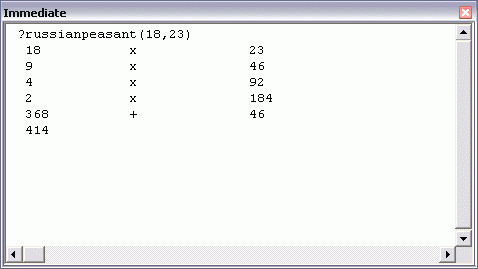
This guy did it in one line. I’ll post a spreadsheet formula solution tomorrow.
Something looks wrong with your function… have you tested RussianPeasant(99, 100) ?
Dick – your code doesn’t always give the right answer. The line:
lMod = lMult
should be
lMod = lMult + lMod
Here’s my effort:
Function RPMult(Num1 As Long, Num2 As Double) As Double
Do While Num1 >= 1
If Num1 Mod 2 = 1 Then RPMult = RPMult + Num2
Num1 = (Num1 2)
Num2 = Num2 * 2
Loop
End Function
I made Num2 a double so it didn’t overflow so quickly.
I’ll be intrerested to see the worksheet approach (I had a think about it, but my brain crashed).
The best I can do…
Array formula in Excel:
=SUM(IF(MOD(INT(G9/2^(-1+ROW(INDIRECT(“1:”&CEILING(LOG(G9)/LOG(2),1))))),2)=1,G10*INT(2^(-1+ROW(INDIRECT(“1:”&CEILING(LOG(G9)/LOG(2),1)))))))
where G9 and G10 contain the numbers to be multiplied.
and in VBA
Function RussianPeasant(ByVal Int1 As Long, ByVal Int2 As Long) As Long
If Int1 = 0 Or Int2 = 0 Then Exit Function
Dim SignMult As Integer: SignMult = Sgn(Int1) * Sgn(Int2)
Int1 = Abs(Int1): Int2 = Abs(Int2)
Do
RussianPeasant = RussianPeasant + IIf(Int1 Mod 2 = 1, Int2, 0)
Int2 = Int2 * 2: Int1 = Int1 2
Loop Until Int1 = 0
RussianPeasant = RussianPeasant * SignMult
End Function
I’ve tried doing this in a plain spreadsheet (and I’m not that great at maths so I may have missed something), but it seems to only work if the number being divided is even. It gets the wrong answer if it’s odd.
So 19 * 23 comes out using this method:
19X23=437
94646
492
2184
1368368
414
Have I misunderstood this completely?
Lizz,
You have missed the other odd element in the list.
It decomposes to
1923
946
492
2184
1368
so you add all of the odds, 368+46+23. You seem to have missed the starting element which is also odd.
Yeah, I was thinking that the first number would only be odd once. But that’s clearly not true. I have no excuse as I was sober when I wrote this post.
Ah, that makes sense, thank you :o) I hadn’t realised the original numbers were included.
Spreadsheet formula.
=A1*B1
If you have a modern spreadsheet, absolutetly no need to conform to the old ways.