The USGA has a formula to compute your handicap and the people who compute my handicap, GHIN, only do so about twice per month. I have no idea why it’s so infrequently, but they probably have their reasons. In the meantime, I’m trying to replicate the formula in Excel.
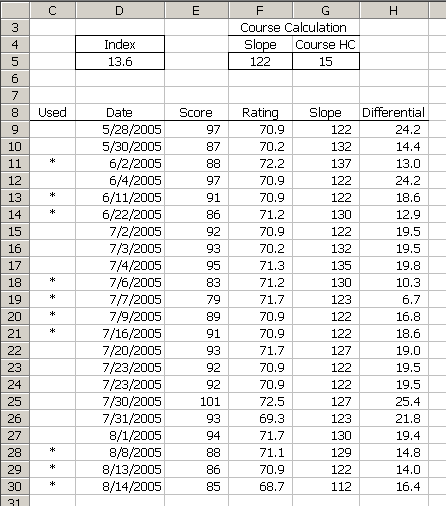
The formulas are:
$D$5 =TRUNC((SUMIF(HistUsed,""",HistDiff)/COUNTIF(HistUsed,"""))*0.96,1)
$G$5 =ROUND(D5/BOGEYSLOPE*F5,0)
$C$9 =IF(OR(D9="",D9
VLOOKUP(COUNT(HistDate),ScoresUsed,2)),"*",""))
$H$9 =IF(D9="","",ROUND((E9-F9)*BOGEYSLOPE/G9,1))
The defined names are:
BOGEYSLOPE  =113

HistDate  =OFFSET(ScoreHistory!$D$8,1,0,COUNT(ScoreHistory!$D$9:$D$64987),1)

HistDiff  =OFFSET(ScoreHistory!$H$8,1,0,COUNT(ScoreHistory!$D$9:$D$64987),1)

HistUsed  =OFFSET(ScoreHistory!$C$8,1,0,COUNT(ScoreHistory!$D$9:$D$64987),1)

ScoresUsed  =Lists!$A$1:$B$11
There are some things missing from this calculation, including 9-hole scores and tournament scores, but it’s a start. I haven’t had the opportunity to check it against the GHIN’s calc yet.
In the D5 formula, I had to SUMIF but I was looking for a wildcard character, namely the asterisk. I don’t know how to SUMIF for an asterisk. Since that column can only have an asterisk or an empty cell, I used the question mark to essentially determine if it had a one character string in it or not. I was pretty proud of that, but I still would like to know how to do it right.
I’m going to try to break down the C9 formula in English.
1 =IF(
2 OR(
3 D9="",
4 D9
17 HistDate,
18 MIN(20,COUNT(HistDate))
19 )),
20 1,
21 1000)),
22 VLOOKUP(
23 COUNT(HistDate),
24 ScoresUsed,
25 2
26 )),
27 "*",
28 ""))
Boy, that was a lot of work and it’s not any easier to follow. Oh well.
Line 1-12: If there is no date or the date is not one of the 20 most recent dates, then return an empty string.
Line 4-8: Find the 20th largest date (or a less than the 20th) and compare that to the date.
Line 6-8: If there are less than 20 entries, then include all the dates, otherwise just the most recent 20.
Line 13: This starts the Else from Line 1. If the date isn’t blank AND the date is within the last 20 dates, then put an asterisks in the cell if the differential is one of the smallest differentials.
Line 22: The smallest differentials will generally be the smallest 10 of the last 20, but if there’s less than 20 scores, the number is different. It’s defined in the ScoresUsed defined name and this looks it up.
Line 14-21: If this differential is less than the xth smallest differential… I start with all the differentials but I need to exclude any that are older than 20 scores old. Normally, you can use an array formula to make those score zero, but I’m in the middle of a SMALL function and I would essentially be making those the smallest (at zero) which screws everything up. Instead, I put an IF in there. If the date is too old, I multiply the differential by 1000 instead of by 1, which will make it so large that it won’t be a factor in the SMALL function.
Clear as mud, huh? Remind me never to explain formulas again.
Update: Because WordPress screws up the quotes, some people are having trouble recreating this worksheet. You can download the workbook Handicap.zip.
Update: I fixed the above download to 1) Handle ties in the differential 2) Handle ties in the date and 3) Protect the formulas.
I’m not sure why you used the “*”. Why not use “X” instead so that the SimIf works as intended?
The asterisk is what GHIN uses and I wanted to keep it consistent. Besides, “X” would have been a cop out, right?
Dick,
The escape character for wildcards is the tilde:
=SUMIF(A1:A4, “~*”, B1:B4)
From Excel’s Help, search for Wildcard.
Cheers,
Rob
Thanks Rob. There’s this new fangled blog that I should be reading to get this kind of information
http://www.dicks-blog.com/archives/2004/05/25/finding-wildcards/
>>Line 14-21:I need to exclude any that are older than 20 scores old. Normally, you can use an array formula to make those score zero, but Iím in the middle of a SMALL function and I would essentially be making those the smallest (at zero) which screws everything up. Instead, I put an IF in there. If the date is too old, I multiply the differential by 1000 instead of by 1, which will make it so large that it wonít be a factor in the SMALL function.
What I meant to say was:
Being a purist, I dislike using an arbitrary number in any formula. I would set the value of the old scores to null strings, instead of multiplying them by 1000. I know … picky, picky, picky! :-)
I couldn’t get this to work for 6 scores(not an excel expert), because the SMALL function in the $C$9 formula was expecting an array for the first argument, but was getting a value instead. I changed it to:
=IF(OR(D9=””,D9=LARGE(HistDate,MIN(20,COUNT(HistDate)))),1,1000)
Nice Work Dick! I was looking for the formula for how they came up with my Handicap as GHIN doesn’t display trend. So… I’ll be writing a little website program to track my scores and such. Thanks!
Hey Dick,
I can’t download the workbook. Would love to use this this tool if possible. Sounds great.
John: should be fixed up now.
It seems, that there is a bug.
If you have say an hcp diff of 17.9 and that happens to be your highest in you last 20 but occurs more than once in you last 20 it counts all of them. Giving you more than 10 best out of you last 20
Thank you for the excellent handicap spreadsheet. Your local golf association should have ratings for each nine of a golf course. I am using it that way and it works great.
Thanks for the Handicap Spread sheet. I will be sure to let others know of your website.
Thanks. However, I’m just curious about the Index calculation. Why is it truncated instead of rounded at the tenths place?
Never mind; I see the USGA handicap rules call for the calculation to be truncated. Great job, and thanks again!
Hi dick, i am having trouble with an excel workbook. I need to calculate the month to date of call logs, but am unsure how to do this.I need the list to refresh after 4 weeks, and begin again.
I would like to insert a column so that I can insert the name of the course but the file is password protected. can you provide the password?
The file isn’t protected and there is no password. The sheet is protected, but not by a password. Try Tools – Protection – Unprotect Sheet.
Your spread sheet doesn’t account for tournament scores as the GHIN does.
Good day,
Im brand new to the concepts and terminology behind golf handicapping. I was just browsing for some excel sheets to begin calculating my handicap. I have played 1 round so far. Lol. I am confused by your sheet. Rows 1-5 indicate that all these calculations are based off of 1 course? If so, why is your slope and rating changing from date to date. If not, why is your Index, Slope and Course HC separated from each entry? Wouldn’t these be different from course to course?
Josh: F3:G5 is it’s own little calculator, not related to the calculation of your handicap. You would just use it to get your course handicap from your index.
Dick,
Thank you very much – this is exactly what I have been looking for? Is the best alternative for a nine-hole score just to double the score (assuming front and back are same par)?
Will: The preferred way is to combine two different nine hole scores into one 18 hole score. To get the the slope and rating for that 18 hole round, you average the slopes and sum the ratings of the nine hole rounds.
Why does the name “BOGEYSLOPE” refer to cell I13? That does not seem correct that every handicape should be based on the 7th score listed. I think there is an error here.
BOGEYSLOPE refers to the constant 113 (One hundred thirteen).
Dick can you send me this spread sheet. I would like to use this for my golf association.
Craig: There’s a link after the first update to Handicap.zip
Thanks for the workbook this will come in very handy
Hello Dick,
Thank you very much for sharing this workbook! I am interested in using this not only “as-is”, but also customizing it for a golf trip that I go on annually with some friends (where we do some handicap “tweaking”). Unfortunately, I am not an Excel expert and am having trouble deciphering the C9 formula.
If you are still “active”, I would love to see a breakdown of the updated workbook in “plain English” since it has changed considerably from what you originally posted.
I know you probably have better things to do than revisit this old post, but I do appreciate you considering this request.
Thanks,
Steve
Dick,
I think I will download your spreadsheet. I play allmost all 9 hole rounds. Does your spreadsheet handle this now?
Cliff
Tornament Name
Course Course1 Course 2 Course 3
Player Handicap Day 1 Handicap Day 2 Handicap Day 3 Par 3 Handicap Day 4
Kota 21 101 0 96
neels 12 88 15
Dear Dick
Man I am struggling with this formula. I know it should involve a if formula. What I am trying to do is to calculate the following.
If Kota a handicap is 21 and he played a101 I want to calculate his handicap immediately for the next days play but his handicap should never increase more than 3 positive or negative.ie if he plays 1or 2 beter than his handicap he should be cut only one stroke between 3 and 4 better than his handicap 2 strokes and more than 43 strokes and visaversa
If her plays 1orr strokes worse than his handicap he gains 1 stroke
3-4 strokes worse he gains 2 strokes but to the maximum of 3 strokes per day
Please help me with this formula
Best
I am trying to use this spreadsheet on Mac Numbers. I am having converting the HistDate, HistDiff, HistUsed, and HistDateCnt formulas. Can you explain how these work? And/or how they transfer if you know.
Those OFFSET formulas all do the same thing. They extend the range from a fixed point down for however much data you have. If you have five rows of data, the range returned by OFFSET is five rows. If you have 50,000 rows, the range returned is 50k rows.
For HistDate, the formula says: Start at I6 and move down 1 row and move right zero columns (that’s the first three arguments). The 4th argument says to make the height of the range equal to the result of a COUNT function. The 5th argument says to make the width of the range 1 column wide.
The COUNT function returns a count of numbers in the range. I know that column I will only contain numbers, so I can use COUNT. If it could contain non-numeric data, I would use COUNTA. When you set up a dynamic range like this, you can’t have any blank rows between your data. In my current version of this file, I have data down to row 302. That means COUNT will return 296 and my range will cover 296 rows x 1 column starting in I7. If I had a blank row, then COUNT would return 295 and the range would not include the data in row 302.
Hi, i am not the excel expert, i still got problem for the C9 formula when i try in spreadsheet. and what is in column I?
There’s nothing in column I in the original. I use it to break ties in one of the later versions:
=IF(D9="","",ROUND((E9-F9)*BOGEYSLOPE/G9,1)-(D9/1000000)).I’m not sure what problems you are having with C9, but make sure you have all the defined names created.
Also, GHIN changed the rules on Jan 1, 2020 to more align with international handicapping, so the logic in this workbook is no longer current.
Just found this great tool! I’d like to know how to track 4 players (we have a set foursome). I know how to “manipulate” Excel basics but I’d be afraid I screw up the formulas adding new columns, etc. Can you help? Thanks!