Here is a little trick for matching two values against a two column table.
It’s much like creating a hash code for each row, then matching the hash code.
With this spreadsheet, the top section allows lookup, the lower section is the lookup table.
Here we are searching for a Value by looking up a City and Season:
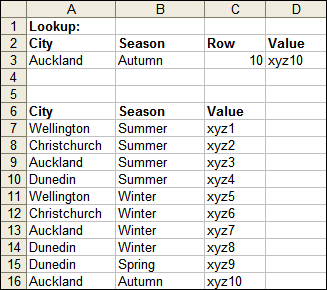
The array formula in cell C3:
=MATCH(A3 & CHAR(1) & B3, A7:A16 & CHAR(1) & B7:B16, 0)
Enter the formula by pressing Ctrl+Shift+Enter.
The formula in cell D3:
=INDEX(C7:C16, C3)
We simply concatenate A3 and B3 to match against concatenated A7:A16 and B7:B16.
The CHAR(1) is to ensure uniqueness.
For example: “userdata” & “base” would also match “user” & “database”
Fixed by: “userdata” & CHAR(1) & “base” does not match “user” & CHAR(1) & “database”
Update:
Daniel M points out a different, more efficient, match lookup using boolean comparison:
The array formula in cell C3:
=MATCH(1, (A3=A7:A16) * (B3=B7:B16), 0)
Enter the formula by pressing Ctrl+Shift+Enter.
D3 remains the same.
This works because…
A3=A7:A16 results in an array of TRUE, FALSE values
Arithmetic on a boolean results in a number. eg. TRUE * FALSE = 0.
Only TRUE * TRUE will result in the “1? MATCH is looking for.
Thanks Daniel!
Good idea. I will use that.
You can replace C3 and D3 with a single array formula in C3:
=INDEX(C7:C16, MATCH(A3 & CHAR(1) & B3, A7:A16 & CHAR(1) & B7:B16, 0))
Enter the formula by pressing Ctrl+Shift+Enter.
– Jon
Hi Rob,
IMO, it’s better to use a boolean matrix (less space, particularly in the case of long names):
As in the following ARRAY formula:
=INDEX(C7:C16,MATCH(1,(A3=A7:A16)*(B3=B7:B16),0))
For anyone confortable with summing with criterias (a la SOMMEPROD), it follows the same pattern.
– Daniel M.
I have been looking for something like this for a while. Excellent.
Andrew
Is this a lot faster than creating a that combines the City and Season and performing a VLOOKUP instead?
I would echo simon’s question. Any thoughts?
Simon,
VLOOKUP only performs matching on one column. This is why the multicolumn MATCH is useful.
Single column vs. multi column lookup cannot be directly compared.
If I was a betting man, I’d say VLOOKUP would win.
Simon,
Sorry – I misread your question.
The overhead of so many formulas in your helper column would mean VLOOKUP is slower.
Cheers,
Rob
Rob:
Array formulas aren’t the most efficient regarding calculation time.
I created a three column range (A1:C65531) with RAND formulas.
With this formula:
{=SUM((A1:A65531>0.5)*(B1:B65531>0.5)*(C1:C65531>0.5))}
The calc time on my system (workbook recalc) was 0.213 seconds.
Next I removed the formula and filles column D with:
=AND(A1>0.5,B1>0.5,C1>0.5)
And replaced the array formula with a simple:
=COUNTIF(D1:D65531,TRUE)
Calc time now equals 0.156, which is about 27 percent faster.
I have had a file that I was able to speed up by a factor three (!) just by removing the array formulas and replacing them with helper columns.
I still am a great fan of array formulas though :-)
JK:
Very helpful – thank you.
Simon:
Please ignore my previous two comments. The 1st comment I misread – the 2nd I totally botched my experiment for calculation timing. Sorry.
I hate spreading misinformation like that – :(
Cheers,
Rob
JK –
“Array formulas aren’t the most efficient regarding calculation time.”
Back when Excel 97 came out, I was building a resource deployment worksheet. List of personnel down column A, list of projects across row 1, percent of FTE in the grid. I had it all worked out, using a sheet with three columns as the data, and displaying the output in a pivot table (which I’d just encountered for the first time, and thought they were pretty neat).
But nobody else could figure out the pivot table, or should I say, none of the bosses. And I wasn’t programming these things yet. So I was told to find another way.
The answer was array formulas. And manual calculation, because so many dozens of array formulas can choke your system. Changing any cell in the grid required 45 minutes to update the row and column totals. The pivot tables were taking, what, some fractions of a second to update. I could have explained the pivot table in just one of the 45 minute delays in array formula calculation (or maybe two, because they were the bosses).
– Jon
Jon:
“or maybe two, because they were the bosses”
:-))))
Hi,
How about using Excel’s excellent database functions?
=DGET(A6:C16,”Value”,A2:B3)
– Asser
Great Post, i used that to great effect on a quoting spreadsheet based on courier destination and state!
The DGET function looks to be quicker than an array But…How do I extend down below the top row
weekcrewtime
W1C14=DGET($A$6:$C$15,”time”,$F$2:G3)
W2C
W3C
pls provide solution ffor multiple coloumn and multiple row solution eg
As/AcAb/Ac0.10.20.30.40.50.60.70.80.9
0.50.253.440.70.30.20.170.160.160.170.18
0.50.5112.371.060.640.520.470.470.470.48
0.5160134.782.060.960.470.310.270.26
0.750.252.190.550.350.310.330.350.360.370.39
0.750.5132.50.890.470.340.310.320.360.43
0.75170155.672.621.360.780.530.410.36
10.253.440.780.420.330.30.310.40.420.46
10.515.531.110.620.480.420.40.420.46
116713.755.112.311.280.810.590.470.46
Branch Duct
As =Area of duct before branch entry300Qs =Airflow in duct before branch enrty3200
Ac =Area of duct after branch entry400Qc =Airflow in duct after branch enrty4000
Ab =Area of brach duct400Qb =Airflow in branch duct800
As/Ac0.75
Ab/Ac1.00Qb/Qc0.20
Branch Run (Co)1.36
the answer should be 15.00
Good Job! Keep it up.
I would like some suggestions if possible. I have 2 columns of data from 2 sources. One is a catalog of cd’s and the other the a database file of what should be in the cd collection. I need a way to organize the data. I need if cd001 is in A2 and its matching counter part cd001 is also on line B724, I need them to find each other. However the data is not all alike cd538 is in column A but not in column B and cd539-2 may be in column B but not A. I need the non-matching entries to have there own line. This way I can compare the two sources of information. Thanks for any help.
Wondeful help with 2 columns vlookup…It help me solve my most tricky problems.
I used this again today and the recalculation is a bit slow, but the result is great as always…
hi Rob…it is possible to do this in java programming? how do is use this in java? can you help me?
Hi,
Is it possible to do this inside Data Validation? Let’s say I have a list of sport products. In my first column I have Brand (Nike, Adidas…) on the second one Product Line (Shoes, Shirts, Jackets…) and on the third column I’ve got the model name. I will have several models inside the same brand and product line. The idea is to select from a list the resulting values.
Thanks!!
Alex: I think you might be looking for this
http://www.dailydoseofexcel.com/archives/2004/05/11/conditional-data-validation/
http://www.contextures.com/xlDataVal02.html
You are the Champ!! Well done.. thanks for the solutions
Thanks! Had been struggling to do this whole day at work without success…now finally…:)
Recently saw this solution
It is a three criteria lookup and works extremely well. The beauty of this is that it is not CSE but a straight formula. Not sure of the overhead on the spreadsheet. I think the char(1) addition mentioned above would enhance it if the data was of such a nature
Cheers
Correction to above
I used the index match combination provided by Daniel above. Need help expanding on that to include a function that will sum all entries from same origin in a third column. To demonstrate:
Column A) forecast/actual…B) company name… C) week x amount
Forecast Company A 10
Delivery Company B 10
Forecast Company A 5
In short, the overall function will need to first identify whether it is a forecast/delivery/promotional activity, then identify company name, then add all figures for that week after narrowing selection from columns A & B. There are approximately 400 companies in my sheet and at least 3-4 entries for each company, which I will be filling for all 52 weeks. Thoughts?? Thanks.
@Matt
I think sumproduct is a better option in that case
guys, this is fantastic information.
I have found a problem with it, I think, where it only works for exact values.
This works just fine:
But this gives an error:
Could this be because the boolean & in INDEX needs to return TRUE&TRUE in order for it to work? And ideas on how I get get this to work with an approximate match?
nuts. that excel code above looked really good in the text box, but then it got formatted down in the comments. Hopefully my question is still sensible.
guys, this is fantastic information.
I have found a problem with it, I think, where it only works for exact values.
This works just fine:
returns -> c
But this gives an error:
returns -> #N/A
Could this be because the boolean & in INDEX needs to return TRUE&TRUE in order for it to work? And ideas on how I get get this to work with an approximate match?
Sorry to keep bugging you. I got an answer from MrExcel forum in the end.
http://www.mrexcel.com/forum/showpost.php?p=3035420&postcount=2
“Try this array formula entered with CTRL + SHIFT + ENTER
=INDEX(C1:C12,MATCH(E1,IF(A1:A12,B1:B12),-1))”
Works like a charm :-)