Yet another use for my new favorite userform control, the WebBrowser control. By loading a PowerPoint slide show into the browser, you can view it without leaving the form. It might be nice for advanced tutorials in a built-in help system.
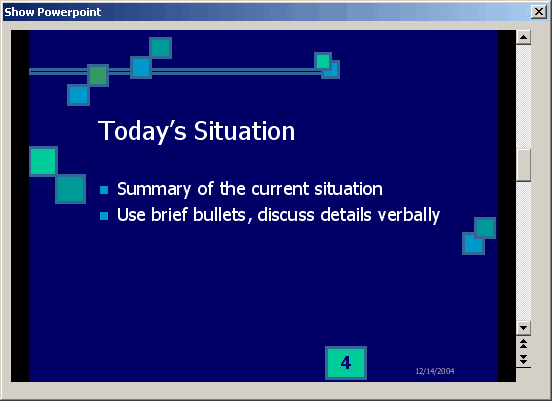
The code is simply
Private Sub UserForm_Initialize()
Me.WebBrowser1.Navigate2 sAPPPATH & “My Presentation.pps”
End Sub
Me.WebBrowser1.Navigate2 sAPPPATH & “My Presentation.pps”
End Sub
What this method doesn’t do is allow you to view a presentation and still use PP macros on controls on the presentation. That was the goal when I was messing with this. If anyone knows how to run PowerPoint within a userform, leave a comment.
Hi,
I’m using Excel 2003 and I can’t get this to work.
Q1: Do I need to add some Additional controls so I can use WebBrowser?
Q2: What is sAPPATH?
regards
Hi Andy
sAPPATH = the Full path to the PPS file
eg if PPS is “C:AMy Presentation.pps” then
sAPPATH =”C:A”
Also with XL2003 you will be given a system warning
As you know it is one of your files, just select “Open”
Andy
Q1: Additional control is “Microsoft Webbrowser”, a toolbarless instance of Internet Explorer. Components is shdocvw.dll, usually found in C:WindowsSystem32
Hi Dick,
An untested suggestion…
Why not instantiate PP itself? Set the window to an appropriate size and show the PP slideshow not in full screen mode but ‘presented by a speaker in a window’ mode. This would be similar to a web page link providing an explanation with a pop up window.
As far as using it for an ‘advanced help’ system goes, it’s an intriguing idea. I suspect your solution is about as good as it gets. It would be foolhardy to presume everyone has PP, so the web browser approach is probably the safest.
Hi Tushar –
Doesn’t the web browser have to instantiate PowerPoint within the browser window in order to show the presentation?
If you assume everyone uses PowerPoint, you’d probably be 90% right anyway.
– Jon
Hi,
Thanks for your quick replies.
I’ve been trying working on this with “My Presentation.pps” but I haven’t been able to work it out. But…
I Saved My presentation as web page and changed the code to:
Me.WebBrowser1.Navigate sAPPATH & “frame.htm”
With sAPPATH = “C:My Presentation_Files”
-> Which is a folder that PP creates when PP projects are saved as web page
Try it and let me knon – Andy
Dick – Comment 6 could be the answer to your question
Can i call some function from within my c# code of a windows application form, that has a webbrowser control embeded intom, it to traverse slides.
To automate the presentation rather than by making it run on user input?
thankyou.
1. there is a pop up asking if i want to play the pps file. is there a way that i can eliminate the pop up and just play the file immediately?
2. also how can i detect that the pps show ended?
im using vb.net with internet browser control to show PPS File.
thanks
Hi, I am trying to play a PPT file within a C# VS .Net 2003 form, I can get the form to simply open the PPT and play it, but I need it to be within the form so that if I momve the form the PPT also moves.
Can you show me how to do this.
Hi, i want to show power point slides on the form then which control i want to take. i want to display slides in small size not a actual size.
Hi all,
I am joey. If you all wouldn’t mind, I would like to know how to show Power Point Presentation on the Form writing in C#.
Best Regards,
Ks.
Hiii whts up???
i wants to show powerpoint presentation on web page…
so how is it possible??? if any one having idea then pls help me out…..
hi i use ppt and chage the form in ppt from excel can u help me
//Reenable Office Assisant, if it was on:
if(bAssistantOn)
{
objApp.Assistant.On = true;
objApp.Assistant.Visible = false;
}
it will avoid popping up of alerts
i need to display all the slides of the power point in the Web Broser like Thumbnails using .net plese help me. its Urgent