Array formulas evaluate ranges of cells and convert them to Trues and Falses. (See Anatomy of an Array Formula). Usually, the array formula works because the Trues and Falses are coerced by Excel to be numbers (1 and 0, to be specific).
Excel doesn’t always coerce those boolean values to numbers. This can happen, for instance, when you’re using array formulas to count, instead of sum or some other mathematical function. Take this simple array formula which counts the number of 3’s in a range.
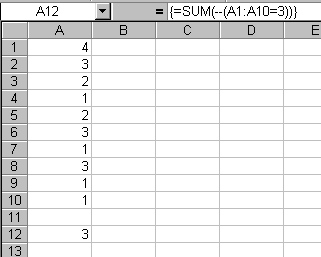
This formula evaluates every cell in the range and returns True if it equals 3. The result is a sum of a bunch of Trues and Falses, and with True = 1 and False = 0, it should return a count of the number of 3’s in the range. However, there’s nothing in this formula that coerces those Trues and Falses into 1’s and 0’s. The SUM function won’t do it. Thus, the formula will return 0 except that some special stuff was added to help Excel.
To force Excel to coerce the booleans appropriately, two negative signs are added to the formula. Excel negates the result, then negates it again which is enough to make it work. You could also write the formula as
=SUM((A1:A10=3)*1)
or
=SUM((A1:A10=3)+0)
Multiplying by 1 or adding 0 also causes the booleans to be converted. I’ve always used the ‘multiply by one’ method until I recently saw the double negative method. I like the double negative better and it seems to be what the pros are using these days.
This gave me a D’Oh! moment. For longer than I care to remember, I’ve used
{=SUM(IF(A1:A10=3, 1, 0))}
which is clunky by comparison. I guess in my defence I’m cautious of assuming a specific numeric value for TRUE and FALSE, as they can vary by application and/or language. But unless Microsoft change the values within Excel that’s probably overdoing the caution a bit.
hi,
can someone helps me to solve this problem?
name no books read month
nasir 1 12-jan-2010
adam 2 12-jan-2010
fatima 3 14-jan-2010
nasir 2 2-feb-2010
adam 1 2-feb-2010
fatima 1 3-feb-2010
nasir 1 7-mar-2010
adam 4 16-mar-2010
fatima 1 21-mar-2010
nasir 1 17-apr-2010
adam 4 18-apr-2010
fatima 1 24-apr-2010
now, what i’m doing is i’m just selecting the specific month and do the counting. The formula is Sum(B2:B4) for january. this come to a problem if the date is not sort accordingly.
what i want is, i’m trying to get the total no of book read in a specific month like jan or mar. but the formula should cover from jan-apr or later month. please someone helps me to generate the formula.
dgnamu: you want this http://www.dailydoseofexcel.com/archives/2004/03/29/sumif-between-two-dates/