To show the result of division as a ratio, you can use a custom number format. For example, the current ratio is current assets divided by current liabilities. Typically, this ratio is shown as x:1, or like this
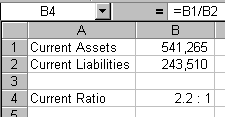
The custom number format applied to the current ratio is set by using Format>Cells>Number
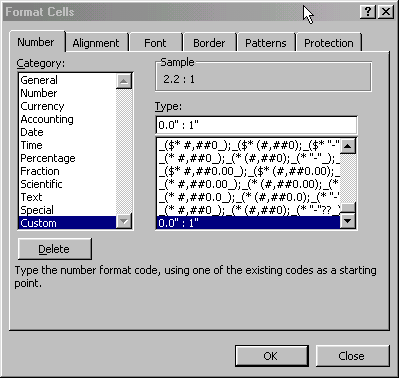
This format works because the current ratio is always shown compared to one. If you want to show a ratio, but the denominator is unknown, you can use tip81 from The Spreadsheet Page.
Thank you! The ratio set up worked perfectly!!!!!!!!!!!!!!!!!!!!
Paul
This reminded me exactly what to do. I knew it was right the second I saw it. Thank you very much, job well done.
dano
I have been trying to figure out for days how to do ratios in excel and I was so glad when I came across this…Thanks to whoever posted this
Thank you for making this function so simple and so easy. I was able to perform a task which would normally have taken me an hour to research in only a matter of five minutes. Much appreciated!
Thank you
Another amazing formatting trick: type a ratio, e.g. 6/5, and precede it by a 0, that is: 0 6/5. See what Excel displays.
Hi, this custom type does not exist in Excel 2007; any idea how to display a ration in this version?
You have to create custom types yourself (although MS creates some to get you started). Choose Custom and type this in the textbox.
Thank you so much for posting this. It was a big help with my accounting project!
Here is another way of doing this
=TEXT(B1/B2,”0.0?)&” : 1?
I came up with this when wanting to show the ratio between two numbers
=”1:”&(A1/B1)
then refined it to show the ratio to only two decimal places
=”1:”&ROUND(A1/B1, 2)
what if the denominator is 0? It gives me an error.
Hi
I’m new to this blog page.
I’m am desperately looking for a ratio on how to attribute a full dollar amount to various departments as a percentage.
The cost of stationery is $1200 and I have many departments to allocate a percentage to based on what they have spent.
e.g.
$1200 has been spent by the Admin Department and I have to % allocated the cost as user pays to each deparment.
The total is $1200 to distribute
HR spent $410.00
Computing $250.00
soccer $315.00
Netball $90.00
Gardening $45.00
etc.
What is the excel sum to correctly attribute a percentage of the $1200 cost to the various departments.
Michelle
Mvick@value.net.nz
Hi Michelle –
It looks to me like it would “department spent/total spent”. That is
$410/$1200, $250/$1200, $315/$1200, $90/$1200, $45/$1200 etc.
And since that only totals 93%, etc pays 7% ;-)
Am I missing something here?
…mrt
This equation formats the cell to read for example 10:1. How can I get it the other way around – as in 1:10? Thanks
@Khuwair – Just reverse it:
“1 : “0.0
Thanks Gordon. It worked perfectly!
I tried reversing it but got the order of the quotation marks wrong. I did 1:”0.0? and the result was 1:00!
HI Everyone.
It doesn’t appear to be working for what I require. Maybe the way I communicated the query.
If I have a total spent expense and I need to divide it over the various departments that have lesser or higher spent. Then the total % has to add up to 100% with none left over. So when I sum up the percentages against the departments it should equal 100%.
Example
total money spent
1966
Department 1 has spent 850 ? xxx% of 1966
Department 2 has spent 950
D. 3 has spent 50
D. 4 has spent 64
D. 5 has spent 52
the percentage ought to value to 100%
Cheers
Hello Michael.
This is what you wrote:
It looks to me like it would “department spent/total spent”. That is
$410/$1200, $250/$1200, $315/$1200, $90/$1200, $45/$1200 etc.
And since that only totals 93%, etc pays 7%
Am I missing something here?
My answer. Your answer worked out perfectly in this order.
I used your idea and finally it worked. =total spent/total of all departments (absolute) / 100
I tried to post the sum graphic but unable to.
many thanks.
Thanks – just what I was looking for.
Hi
I’ve been going through these responses and have tried a few things. Some worked, some didn’t. I have a two part question, though. (1) I am trying to calculate the ratio between two numbers. My spreadsheet looks like this:
3,209 2,049 1:1.57
468 749 1:0.62
173 492 1:0.35
148 421 1:0.35
I used the ratio formula =”1:”&round(a1/b1, 2). My question is: Is this the correct formula? I know nothing about ratios but I feel like the ratios are incorrect for some reason.
(2) Is there a way to calculate the average of this list of ratios, and present it in ratio form? My boss asked for this and I have no idea if it’s even possible.
You just have them backward. To get “1? you need to divide the first number by 3,209. To get the second part of the ratio, you have to divide the second number by the same thing: 3,209. So
I have 200 staff members and 189 desks. I want to know the ratio of staff to desks. I don’t want it drilled down to :1 as the UK Governement average is 8:10 desks. I need to know what my ratio is as a whole on the floor so I can compare.
Using Excel 2007 – what do I need to do to get the ratio and for it to display as ‘Staff’:’Desks’ ?
Thanks
Richard
@Richard,
In order to produce a ratio to something other than :1, you need to set one of the ratio items and calculate the other. To understand why, look at your example 8:10… that is identical to 16:20 and 4:5 as well as infinitely many other ratios. Here is a general set-up that will allow you to specify the right-hand number (the 10 in 8:10) and calculate the other. Put your staff member count (200) in A1 and your desk count (189) in A2, then put your right-hand target ratio value (10) in B1 and then finally put this formula in whatever cell you want to display the ratio in…
=B1*A2/A1&”:”&B1
You can produce other ratio displays by changing the value in B1 if 10 is not the target value you want for the right-hand number.
Thank you for this discussion. I helped me out of jam!
to approximate the above ratio to a whole number : 1 try this below
=ROUND(B1/B2,0)& “: 1? (put a space between & and “, and also between : and 1)
so you will get 2:1 above instead of 2.2:1
but if you want the ratio to one decimal place try this:
=ROUND(B1/B2,1)& “: 1?
if you want the ratio to two decimal places try this:
=ROUND(B1/B2,2)& “: 1?
etc
i have been trying to divide 1000 in the ration 2:3 but it is not working. What can i do?
Maria maybe you should try this one =A1/GCD(A1,B1)&”:”&B1/GCD(A1,B1)
Thank you everyone. These suggestions have all been really helpful.
I am unsure if this already has been posted. What I am looking to do is set up an excel sheet where I can have if figure the “part to whole” ratio. For example if my ratio is 10:1 and I need a total of 2.5 lbs. I just have not found a spot for how to have excel calculate the the necessary amount of each part to make the whole. Any suggestions?