Who wants to talk about college football, class modules and XMLHttp requests? Anyone? Well, for the two of you left, here’s what I got. The problem with comparing team statistics, especially early in the season, is cupcakes. Cupcakes are teams that aren’t very good at football. Teams like to schedule them to work out the kinks and get an easy win. The problem is that the better teams rack up ungodly statistics against these teams and it skews the totals. To wit, as of the fourth week of the season Kansas State had the best defense in the country (now 16th best). Are they really that good? They played Eastern Kentucky, Kent, and Miami Fl. They held Eastern Kentucky to 129 total yards, while Miami was north of 400 yards. Enough of the football lesson. I needed a way to exclude certain games from a team’s stats to make a meaningful comparison.
I start at cfbstats.com, by far the best source for college football stats. They have a “game log” section that breaks down the stats by game, but there’s no easy to way to compare teams or exclude games. I endeavor to fix that.
I will have two objects, Team and Game. I’ll focus on teams in this post and games in the next. This is very much a work in process, but I’ll make the final workbook available when it’s done.
My Team object is pretty simple. It has TeamName and TeamAKA as its only getter/setter properties. It also has a collection of games and a few other read-only properties. I use my VBAHelper code to create CTeam and its parent CTeams. My teams are listed in a sheet, that in part, looks like this:
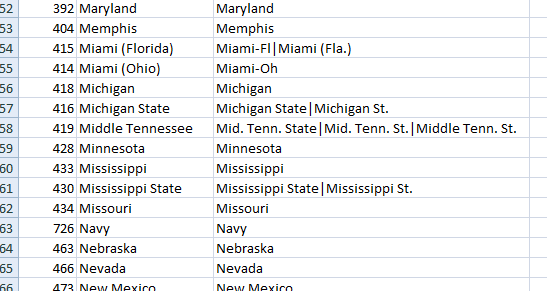
Column A is a number that cfbstats.com assigns to each team and I’ll need it to find their stats on the site. Column B is the name that I’m using as the TeamName – something consistent, which most of the college football world can’t seem to grasp. Which leads to column C: a pipe-delimited list of every other name that teams goes by. Some of those alternative spellings are used on cfbstats.com and some from other sources. Uniquely identifying teams is a pain, even from a single source. The first thing I need is some code to get that spreadsheet into my class. In CTeams:
|
1 2 3 4 5 6 7 8 9 10 11 12 13 14 |
Public Sub FillFromRange(rTeams As Range) Dim rCell As Range Dim clsTeam As CTeam For Each rCell In rTeams.Columns(1).Cells Set clsTeam = New CTeam clsTeam.TeamID = rCell.Value clsTeam.TeamName = rCell.Offset(0, 1).Value clsTeam.TeamAKA = rCell.Offset(0, 2).Value Me.Add clsTeam Next rCell End Sub |
It’s a pretty typical FillFromRange procedure that I use. Pass in a range, loop through the first column, populate a CTeam object, and add it to the collection. Now I make sure it works as expected. In my module MTest:
|
1 2 3 4 5 6 7 8 9 10 11 12 13 14 15 |
Sub TEST_FillTeams() Dim clsTeam As CTeam Set mclsTeams = New CTeams mclsTeams.FillFromRange wshTeams.Range("A2:C121") For Each clsTeam In mclsTeams With clsTeam Debug.Print .TeamID, .TeamName, , .TeamAKA End With Next clsTeam End Sub |
It’s not a real test, but it does expose any problems with a quick review of the output. I know I’ll need to find a CTeam object by the team’s name, so let’s get that code out of the way. In CTeams:
|
1 2 3 4 5 6 7 8 9 10 11 12 13 14 15 16 17 18 |
Public Property Get TeamByName(sName As String) As CTeam Dim clsTeam As CTeam Dim clsReturn As CTeam Dim lsName As String lsName = CleanName(sName) For Each clsTeam In Me If clsTeam.TeamName = lsName Or clsTeam.IsKnownAs(lsName) Then Set clsReturn = clsTeam Exit For End If Next clsTeam Set TeamByName = clsReturn End Property |
The first step is to clean up the name. When I get the name from the game log on cfbstats.com, it will have a few extraneous characters. It will have an “@” to indicate an away game, a “+” to indicate a neutral site game, and it will have a number if the team is ranked in the top 25. In my module MUtilities
|
1 2 3 4 5 6 7 8 9 10 11 12 13 14 15 |
Public Function CleanName(sName As String) As String Dim sReturn As String Dim i As Long sReturn = Replace(sName, "@", "") sReturn = Replace(sReturn, " + ", "") For i = 0 To 9 sReturn = Replace(sReturn, i, "") Next i CleanName = Trim(sReturn) End Function |
This strips out the @ and + and any numbers if finds. Next I need to compare the captured name with not only the TeamName, but anything in the TeamAKA property. For that I create a read-only property called IsKnownAs in CTeam.
|
1 2 3 4 5 6 7 8 9 10 11 12 13 14 15 16 17 18 |
Public Property Get IsKnownAs(sName As String) As Boolean Dim vaAka As Variant Dim i As Long Dim bReturn As Boolean vaAka = Split(Me.TeamAKA, msAKADELIM) For i = LBound(vaAka) To UBound(vaAka) If vaAka(i) = sName Then bReturn = True Exit For End If Next i IsKnownAs = bReturn End Property |
This split the TeamAKA property on the pipe delimiter and checks for a match. Now I can return a CTeam object by passing in a name. Next I create a CGame class and a CGames class. CGame has the following properties
HomeTeam As CTeam
AwayTeam As CTeam
GameDate As Date
HomeScore As Double
AwayScore As Double
HomeRushYards As Double
AwayRushYards As Double
HomePassYards As Double
AwayPassYards As Double
HomePlays As Double
AwayPlays As Double
The stats I’m most interested in to start are Points/Yard on offense and Yards/Point on defense. The number of plays was sitting right there on the same web page so I recorded it as well, but it’s not in my immediate plans to use. In the next post, I’ll show how I use XMLHttp to get the game data.
rather than class modules I use public types. I wrote the code a long time ago for NFL.
though your approach to regression is arduous (one variable at a time) tools like SAS can run multiple regression tests to see if R-squared is meaningful for variables tested.
Public Type NFL_TEAM
TeamName As String
Moniker As String
Wins As Integer
Losses As Integer
Ties As Integer
win_percent As Double
Conference As String
Division As String
HomePts As Integer
AwayPts As Integer
TotalPts As Integer
OppHomePts As Integer
OppAwayPts As Integer
OppTotalPts As Integer
rowReference As Integer ‘row on the Records sheet
End Type
Public Type NFL_GAME
HomeTeam As String ‘home team
AwayTeam As String ‘away team
Winner As String ‘winner of the game
Loser As String ‘loser of the game
Tie As Boolean ‘tie true/ false
Pick As String ‘players pick
Favorite_Count As Integer ‘num times favorite is picked
Underdog_Count As Integer ‘num times underdog is picked
GameDate As String ‘date of game
GameTime As String ‘time of game
Weather As Integer ‘weather in game
Spread_Open As Single ‘opening spread
Spread_Close As Single ‘closing spread
End Type
Public Type NFL_WEEK
NumGames As Integer ‘Current Weeks Num of games
Winner As String ‘current weeks winner
MaxRight As Integer ‘current winners total games right
GamesPlayed As Integer ‘number of games played to date
CurrentGame As NFL_GAME ‘game level info
CurrentPlayer As NFL_PLAYER ‘player level info
Favorite As NFL_TEAM
VegasFavorite As NFL_TEAM
End Type
was the final workbook for this ever posted?
aj: I never made it available and it’s still not ready for prime time. But here it is anyway.
It’s not user-friendly – not even close. You need to change two things in the MakeSchedule code
Const lRANK As Long = 40sUrl = "http://www.cbssports.com/collegefootball/scoreboard/1A/2012/week5"
lRANK determines how far away an opponent is to be considered qualified. An lRANK of 40 means that an opponent has to be within 40 positions of the current opponent. If the current opponent is ranked 30, every past opponent who is ranked between 1 and 70 is considered qualified. Decrease that number for fewer qualified games, but better results. Increase that number for more qualified games, but sketchier results.
The sURL variable has to be changed every week. For this week, change it to "week6" to get the current matchups.
If you run MakeSchedule, a new sheet will be created with the matchups and selected statistics.
This file isn't for the feint of heart, so if you're not comfortable in VBA, you may want to skip it.