Why do I keep creating userforms to get passwords? That’s it. This is the last time I’m doing it. From now on, I’ll just import UPassword.frm
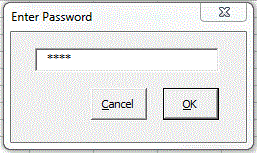
Here’s the code behind the form. Nothing special, I’m just tired of typing it.
Private mbUserCancel As Boolean
Private msPassword As String
Public Property Get Password() As String: Password = msPassword: End Property
Public Property Let Password(ByVal sPassword As String): msPassword = sPassword: End Property
Public Property Get UserCancel() As Boolean: UserCancel = mbUserCancel: End Property
Public Property Let UserCancel(ByVal bUserCancel As Boolean): mbUserCancel = bUserCancel: End Property
Private Sub EnableDisable(ctl As MSForms.CommandButton, bEnable As Boolean)
ctl.Enabled = bEnable
End Sub
Private Sub cmdCancel_Click()
Me.UserCancel = True
Me.Hide
End Sub
Private Sub cmdOK_Click()
Me.Password = Me.tbxPassword.Text
Me.UserCancel = False
Me.Hide
End Sub
Private Sub tbxPassword_Change()
Const lMINLENGTH As Long = 4
EnableDisable Me.cmdOK, Len(Me.tbxPassword.Text) >= lMINLENGTH
End Sub
‘Example of how to use. Put this in a standard module
‘Public Function GetPassword() As String
‘
‘ Dim ufPassword As UPassword
‘
‘ Set ufPassword = New UPassword
‘
‘ ufPassword.Show
‘
‘ With ufPassword
‘ If Not .UserCancel Then
‘ GetPassword = .Password
‘ End If
‘ End With
‘
‘ Unload ufPassword
‘ Set ufPassword = Nothing
‘
‘End Function
‘
‘Sub Test_GetPassword()
‘
‘ Dim lUser As Long
‘
‘ lUser = Val(GetPassword)
‘
‘ If lUser > 0 Then
‘ Debug.Print lUser
‘ End If
‘
‘End Sub
Why do we mask password entries? Whenever I enter something that displays *** I wonder whether I got the last character right or not. There is never ever a sinister person looking over my shoulder, not in my office, not in my home. Inputbox will imo do (unless you’re into fingerprint readers ++).
@Harald,
You can always type your password into any text field (the Google search bar, Notepad, VBA’s Immediate Window, whatever) and then copy/paste it from there into the password field. There are a small number of websites that will not permit this, but for the most part, the vast majority will.
@Harald,
Check out what “2 Password” has to offer: http://download.cnet.com/2-Password/3000-2094_4-10154805.html
[…] was inspired by Dick Kusleika’s post Masking Passwords (http://www.dailydoseofexcel.com/archives/2011/07/12/masking-passwords/). It’s an enhanced version of DK’s approach in the sense that the same userform module supports […]
[…] daily does of excel […]
Hello,
I like the the FRM file, thanks a lot.
Some UI (web UI) display shortly the real value before masking with the asterisk (*).
I think writing this with VBA won’t make nice and fast result.
however, we could think of using javascript.
bye