Hi there!
Many times it is a newsgroup post which triggers me to do a writeup on a specific subject. This time, a user asked how he could import a csv file every month, without having to go through the hassle of renaming the file and re-defining the import settings each time.
Opening the file in Excel directly gave unwanted results, similar to this:
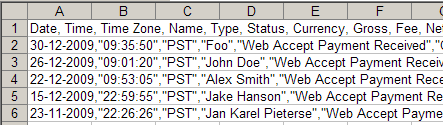
I have added an article to my website which details out how to set things up properly to save you some work:
Importing text files in an Excel sheet
Regards,
Jan Karel Pieterse
www.jkp-ads.com
Nice article JK
I have two code pages on my site so maybe they are useful for readers of this blog
http://www.rondebruin.nl/txtcsv.htm
http://www.rondebruin.nl/csv.htm
This was the most helpful tip I’ve seen this year on any of the Excel boards and blogs. I was able to put it to use immediately. and now will be able to do my EOM sheets in a tenth of the time. (Don’t tell my boss)
Thanks Ed, glad my articles has helped you out so quickly!