A few years ago, I wrote a Formula Formatter add-in to present a long formula for easier reading. It does it through a process called Tokenizing, which is basically a process of putting the components of a formula into labelled boxes.
That add-in was compatible with Excel 2003 formulas, but Excel 2007 brought us extra formulas which meant my add-in was incomplete.
It was the first time I’d ever developed a tokenizer, so after a while I thought of better ways of doing it.
From my Oracle days, I recalled those diagrams in SQL manuals. Kind of like bubbles with lines leading in and leading out detailing the syntax of a statement. At the time I figured I could reuse this technique to document Excel Formulas. Of course, now that I’ve done a bit of reading, I’ve learned these are called Syntax Diagrams, and that’s exactly what they were intended for… visualising the syntax of formulas, or really, visualising BNF. BNF itself is a way of documenting a programming language’s grammar.
After some weeks of ripping apart formulas, I completed a BNF document describing Excel Formulas.
Probably the very next day, I stumbled across this document on Microsoft’s website: Excel Binary File Format (.xls) Structure Specification. It’s got BNF galore.
I felt like the guy who spent a weekend learning to program his VCR without a manual, only for the manual to turn up the next day.
So, with syntax in hand, I developed a tokenizer, which was quite a lot of fun.
It does Excel 2007 Tables, which was really my goal from the start. I also tidied up the bits around external named references.
It should work with International versions, but I use English only.
Ron de Bruin gave me some advice in this area (thanks Ron!), but still feel there might be problems with errors such as #VALUE!. You’ll find them defined once at the top of the module if you want to play.
Now that I’m finished, I’m sharing… You can download the code here (a zip file at 75 KB)
I’m not really interested in developing a user interface for formula formatter this time around. I’m happy to leave that to anyone else.
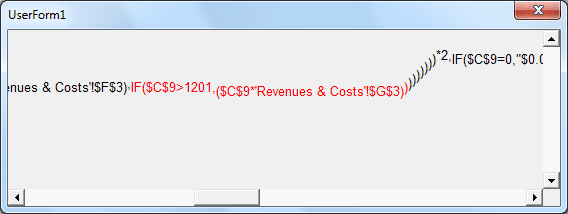
I wrote a proof of concept userform. In the image below, I’ve doubleclicked the IF function, and the whole IF, including it’s content, is highlighted.
Rob, I tried to down load the 2005 AudXL app without success! Is it still available?
You can find it on my website:
http://vangelder.orcon.net.nz/excel/
Rob,
But I found it at the following link. Is there any update after that ?
http://vangelder.orconhosting.net.nz/excel/audxl.html
Rob, that is the link that I used but, when clicking through, it changed to http://vangelder.orconhosting.net.nz/excel/ with a Google Trivia link and the rest of the page being blank. Something I’m doing wrong here or a setting in IE on my PC?
The link Kanwaljit has did work though.
Regards.
Sorry, I’m better at Excel than at making webpages!
Kanwaljit’s link is what you want. That was the last version I made.
Hi Rob,
I’ve recently been playing around with your original tokeniser (from AudXL) and have found it to be excellently written, fast and very useful. I’ve only just found this article where you introduce the new version. To be honest, I’ve not really used the original code in XL2007 much so hadn’t noticed any issues with it in that respect, but am keen to use the new code as I’ll doubtless be using XL2007/2010 more going forward.
Two quick points:
1. In the original version, the parser incorrectly recognised a cell with the text “Unit(s)” in it (note: not entered as a formula, just as a text label) as a function called Unit. This was pretty easy to fix but I thought you might like to be aware of it. I don’t think the new version has the same problem. It happens with any text with an open bracket after it.
2. In the old version you had a specific token type for ‘Operand Reference Named Range’ which seems to have gone from the new version – both cell references and named ranges are returned as token type ‘Reference’. I quite liked having the ability to distinguish between a reference to a cell and a reference to a named range so I was thinking of adding some code to do this. In your original tokeniser you wrote a function called ‘IsReferenceA1’ to check if a reference was to a cell or to a named range and I was thinking of re-writing this for XL2007 (to take account of the Big Grid). Before I do that I was wondering if you’d already tried that and abandoned it as not being possible, or if there was some other reason you left it out.
Many thanks for offering this great code to the community – it’s been hugely inspiring, educational and useful!
Rgds,
Ben
“Now that I’m finished, I’m sharing…”
Thanks Rob.
I started using BN back in the early seventies, but have been away for a while.
I felt a need to write a formula parser, and you popped up in a search.
Your comment above reminds me of the spirit back in the days of 80-column punched cards ….
Here you are: Enjoy a free copy of the indexer!
http://www.Indxr.ca
A bit late in replying, sorry.
Ben: I decided not to go as far as distinguishing between cell references and named references. I don’t think it would be too hard to work out, but there’s the added problem of 2007 versus 2003 names.
In 2003 ABC123 is a name, but in 2007 it’s a cell.
Chris: pleased it’s of use to someone. cheers
Hi Rob,
I’ve started using the tokeniser code in anger recently and noticed an ‘interesting’ memory issue that I can’t seem to resolve…
If you add a sheet to the Parser.xls file with about 40,000 formulae on it (just to give you something to work with) and run the tokeniser on each cell in turn then the memory used by Excel shoots up dramatically (an increase of over 120MB once all cells are processed). FYI I’m running Excel 2010 and the test code I ran looks like this:
Dim rngT As Range
Dim tknT As Tokens
For Each rngT In Sheet23.UsedRange
If Left(rngT.Formula, 1) = “=” Then
Set tknT = ParseFormula(rngT.Formula)
End If
Set tknT = Nothing
DoEvents
Next rngT
End Sub
As you can see I’m killing the tknT variable after each call of ParseFormula and as such wouldn’t expect the memory to rise as much as it is. The other odd thing is that once the code has completed running, if you click on the ‘Reset’ button in the VBE (looks like a Stop button next to the Play and Pause buttons) Excel seems to release all the memory that it has stored up (it takes a while for it to do this though and Excel hangs whilst doing it).
I can’t seem to see any global variables that are used in the Tokeniser so am really at a loss to understand what’s going on. Any ideas?!
Many thanks,
Ben.
Just found the following and wonder if it might have something to do with it:
http://www.vbi.org/Items/article.asp?id=106
Will have a look at the tokeniser code and see if it falls into that trap. My gut feel is that it does…
Rgds,
Ben
Ok, so I’ve found the issue and it is pretty much as described on the link above. The Class ‘Token’ contains a Public member called ‘Parent’ that is of type Class Tokens, thus creating the circularity described in the above article.
If you remove this member (and all references to it elsewhere in the code) then the memory issue is resolved. Note that in my application I have removed all of the code relating to the example form Rob included so the ‘Parent’ member is actually redundant anyway.
I’ve also added code at the end of the main ParseFormula procedure to set all local objects to Nothing, as well as code to do the same upon class_terminate for each of the classes.
Hope someone finds the above useful!
Ben
Hi Ben.
Thanks for identifying the bug!
That wasn’t very clever of me – naturally it would memory leak.
There is a way around it, as commented by Rob Bruce here.
Cheers
Hi Rob, I just started to use AudXL, at the begining I used with Excel 2007 and it works fine, now I am using Excel 2010 and it does not work anymore, some kind of library reference issue; I am not a developer so for me its really hard to change the vba code in order to make things works; so, could you give some tip what to do, o maybe what part I have to change in the add in. I really appreciate.
Sorry for my english
Hi Rob,
quite good work you put up here.
I have tried to find the BNF for the excel formulas in the Excel Binary File Format (.xls) Structure Specification however i failed to find it :(
Can you maybe give me some advice where to look ?
Hi Rob/Ben,
I have this tokenizer to a good extent to make a step by step formula evaluator for complicated formulas but I am facing a lot of issues
with memeory leak the current level of physical memory is 300,000 k. I have followed what Ben had highlighted in older post on setting local obj to nothing and removed the Public member ‘Parent’.
Any expert suggestions?
Hi Rob,
The link you posted is broken. Could you please repost it? Thanks :)
Max
Max: This one?
http://vangelder.orconhosting.net.nz/files/ExcelFormulas.zip
Many thanks for this code, I have found it extremely useful for a project I’m working on to adjust function calls between two add-ins that do similar stuff but differently.
I have converted it to C# for my purposes and below is a copy of the C# class I’ve derived from your VBA code.
    class XLTokenizer

    {

        private enum ParsingState

        {

            Expression1,

            Expression2,

            LeadingName1,

            LeadingName2,

            LeadingName3,

            LeadingNameE,

            WhiteSpace,

            Text1,

            Text2,

            Number1,

            Number2,

            Number3,

            Number4,

            NumberE,

            Bool,

            ErrorX,

            MinusSign,               // for ambiguity between unary minus and sign

            PrefixOperator,

            ArithmeticOperator,

            ComparisonOperator1,

            ComparisonOperator2,

            ComparisonOperatorE,

            TextOperator,

            PostfixOperator,

            RangeOperator,

            ReferenceQualifier,

            ListSeparator,           // for ambiguity between function parameter separator and reference union operator

            ArrayRowSeparator,

            ArrayColumnSeparator,

            FunctionX,

            ParameterSeparator,

            SubExpression,

            BracketClose,

            ArrayOpen,

            ArrayConstant1,

            ArrayConstant2,

            ArrayClose,

            SquareBracketOpen,

            Table1,

            Table2,

            Table3,

            Table4,

            Table5,

            Table6,

            TableQ,

            TableE,

            R1C1Reference           // todo: implement R1C1Reference

        }
public enum TokenType
{
Text,
Number,
Bool,
ErrorText,
Reference,
WhiteSpace,
UnaryOperator,
ArithmeticOperator,
ComparisonOperator,
TextOperator,
RangeOperator,
ReferenceQualifier,
ExternalReferenceOperator,
PostfixOperator,
FunctionOpen,
AtFunctionOpen,
ParameterSeparator,
FunctionClose,
SubExpressionOpen,
SubExpressionClose,
ArrayOpen,
ArrayRowSeparator,
ArrayColumnSeparator,
ArrayClose,
TableOpen,
TableSection,
TableColumn,
TableItemSeparator,
TableColumnSeparator,
TableClose
}
public class Token
{
public String TokenText { get; set; }
public TokenType TokenType { get; set; }
public bool Quoted { get; set; }
public int FormulaIndex { get; set; }
public Token(String tokenText, TokenType tokenType, bool quoted, int formulaIndex)
{
TokenText = tokenText;
TokenType = tokenType;
Quoted = quoted;
FormulaIndex = formulaIndex;
}
}
[Serializable()]
public class ParseException : System.Exception
{
public ParseException() : base() { }
public ParseException(string message) : base(message) { }
public ParseException(string message, System.Exception inner) : base(message, inner) { }
protected ParseException(System.Runtime.Serialization.SerializationInfo info, System.Runtime.Serialization.StreamingContext context) { }
}
private static char cDecimalSeparator = '.';
private static char cListSeparator = ',';
private static char cArrayRowSeparator = ';';
private static char cArrayColumnSeparator = ',';
private static char cLeftBrace = '{';
private static char cRightBrace = '}';
private static char cLeftBracket = '[';
private static char cRightBracket = ']';
private static char cLeftRoundBracket = '(';
private static char cRightRoundBracket = ')';
private static char cDoubleQuote = '\"';
private static String strBooleanTrue = "TRUE";
private static String strBooleanFalse = "FALSE";
private static String strErrorRef = "#REF!";
private static String strErrorDiv0 = "#DIV/0!";
private static String strErrorNA = "#N/A";
private static String strErrorName = "#NAME?";
private static String strErrorNull = "#NULL!";
private static String strErrorNum = "#NUM!";
private static String strErrorValue = "#VALUE!";
private static String strErrorGettingData = "#GETTING_DATA";
private static String strLNSeparators = "+-*/^%=<>&:" + cRightRoundBracket + cRightBrace + cListSeparator;
private static String strArithmeticOps = "+-*/^";
private static String strComparisonOps = "=<>";
private static String strsBoolean = "\t" + strBooleanTrue +
"\t" + strBooleanFalse +
"\t";
private static String strsError = "\t" + strErrorRef +
"\t" + strErrorDiv0 +
"\t" + strErrorNA +
"\t" + strErrorName +
"\t" + strErrorNull +
"\t" + strErrorNum +
"\t" + strErrorValue +
"\t" + strErrorGettingData +
"\t";
public static List testStrs = new List ()
{
"=1\n\n \n 5",
"=(A1 ,A5)",
"=\"123\"\"456\"\"789\"",
"=3.1E-24-2.1E-24",
"=[MyBook.xlsx]Sheet1!$A$1",
"=Func(,\"abc\",,)",
"=IF(P5=1.0,\"NA\",IF(P5=2.0,\"A\",IF(P5=3.0,\"B\",IF(P5=4.0,\"C\",IF(P5=5.0,\"D\",IF(P5=6.0,\"E\",IF(P5=7.0,\"F\",IF(P5=8.0,\"G\"))))))))",
"=SUM((A:A A1:B1))",
"='MyCOM.AddIn.Function_Name'(,\"abc\",,)",
"=IF(\"a\"={\"a\",\"b\";\"c\",#N/A;-1,TRUE}, \"yes\", \"no\") & \" more \"\"test\"\" text\"",
"=+ AName- (-+-+-2^6) = {\"A\",\"B\"} + @SUM(R1C1) + (@ERROR.TYPE(#VALUE!) = 2)",
"=SUM('Sheet-1'!A1:'Sheet-1'!A10)",
"=Table1[#Headers]",
"=Table1[[a]:[b]]",
"=Table1[ [#Headers], [#Data], [a]:[b] ]",
"=IF(((IF(D4<>\"\",((D5-D4)-0.020833333333),0))+(IF(D10<>\"\",((D11-D10)-0.020833333333),0))+(IF(D16<>\"\",((D17-D16)-0.020833333333),0))+(IF(D22<>\"\",((D23-D22)-0.020833333333),0))+(IF(D28<>\"\",((D29-D28)-0.020833333333),0))+(IF(D34<>\"\",((D35-D34)-0.020833333333),0))+(IF(D40<>\"\",((D41-D40)-0.020833333333),0)))*24<=40,((IF(D4<>\"\",((D5-D4)-0.020833333333),0))+(IF(D10<>\"\",((D11-D10)-0.020833333333),0))+(IF(D16<>\"\",((D17-D16)-0.020833333333),0))+(IF(D22<>\"\",((D23-D22)-0.020833333333),0))+(IF(D28<>\"\",((D29-D28)-0.020833333333),0))+(IF(D34<>\"\",((D35-D34)-0.020833333333),0))+(IF(D40<>\"\",((D41-D40)-0.020833333333),0)))*24,40)",
"=Table1[[#All],[b'[]]",
"=IF(L40>65,AQ26,ROUND((L12*IF(OR(AND(L40>=55, L41>=20),AND(L41>=20,$C$11=\"YES\")),L45,L44))+(L15 *IF(OR(AND(L40>=55,L41>=20),AND(L41>=20,$C$11=\"YES\")), L46,L44)),0))"
};
public static void RunTests() tokens = ParseFormula(formulaStr);
{
foreach (String formulaStr in testStrs)
{
List
if (tokens != null)
{
String reformedStr = ReformFormula(tokens);
if (!reformedStr.Equals(formulaStr))
{
throw new ParseException("Failed to parse and reform \"" + formulaStr + "\"");
}
}
}
}
public static String ReformFormula(List tokens)
{
String formulaStr = "=";
foreach (Token token in tokens)
{
if (token.TokenType == TokenType.AtFunctionOpen)
formulaStr += "@";
if (token.TokenType == TokenType.Text)
{
formulaStr += cDoubleQuote;
foreach (Char c in token.TokenText)
{
if (c == cDoubleQuote)
formulaStr += cDoubleQuote;
formulaStr += c;
}
formulaStr += cDoubleQuote;
}
else
{
if (token.Quoted)
{
if (token.TokenType == TokenType.TableColumn || token.TokenType == TokenType.TableSection)
{
formulaStr += "[" + token.TokenText + "]";
}
else
{
formulaStr += ''';
foreach (Char c in token.TokenText)
{
if (c == ''')
formulaStr += ''';
formulaStr += c;
}
formulaStr += ''';
}
}
else
formulaStr += token.TokenText;
if (token.TokenType == TokenType.FunctionOpen || token.TokenType == TokenType.AtFunctionOpen)
formulaStr += cLeftRoundBracket;
else if (token.TokenType == TokenType.TableOpen)
formulaStr += cLeftBracket;
}
}
return formulaStr;
}
public static List ParseFormula(String strFormula) tokens = new List (); tokenStack = new Stack ();
{
int lngFormulaLen = strFormula.Length;
if (lngFormulaLen <= 1) { throw new ParseException("Formula too short"); } if (!strFormula.StartsWith("=")) { throw new ParseException("Formula doesn't start with '='"); } List
Stack
ParsingState parseState = ParsingState.Expression1;
ParsingState parseReturnState = parseState;
String currentTokenStr = "";
int tokenIndex = 0;
bool continueParse = true;
int iChar = 1;
bool inQuote = false;
while (continueParse)
{
char c = (iChar < lngFormulaLen) ? strFormula[iChar] : Char.MinValue; switch (parseState) { case ParsingState.Expression1: { if (Char.IsWhiteSpace(c)) { parseReturnState = parseState; parseState = ParsingState.WhiteSpace; tokenIndex = iChar; } else if (c == cDoubleQuote) { parseReturnState = ParsingState.Expression2; parseState = ParsingState.Text1; tokenIndex = iChar; iChar++; } else if (Char.IsDigit(c)) { parseReturnState = ParsingState.Expression2; parseState = ParsingState.Number1; tokenIndex = iChar; } else if (c == '-') { currentTokenStr = Char.ToString(c); parseReturnState = ParsingState.Expression2; parseState = ParsingState.MinusSign; tokenIndex = iChar; iChar++; } else if (c == '+') { parseState = ParsingState.PrefixOperator; tokenIndex = iChar; } else if (c == cLeftRoundBracket) { parseState = ParsingState.SubExpression; } else if (c == cLeftBrace) { parseState = ParsingState.ArrayOpen; } else if (c == ''') { parseState = ParsingState.LeadingName2; inQuote = true; tokenIndex = iChar; iChar++; } else if (c == '#') { parseReturnState = ParsingState.Expression2; parseState = ParsingState.ErrorX; tokenIndex = iChar; } else { parseState = ParsingState.LeadingName1; tokenIndex = iChar; } } break; // -------------------- -------------------- -------------------- case ParsingState.Expression2: { if (c == Char.MinValue) { continueParse = false; } else if (Char.IsWhiteSpace(c)) { parseReturnState = parseState; parseState = ParsingState.WhiteSpace; tokenIndex = iChar; } else if (c == cRightRoundBracket) { parseState = ParsingState.BracketClose; } else if (strArithmeticOps.Contains(c)) { parseState = ParsingState.ArithmeticOperator; tokenIndex = iChar; } else if (strComparisonOps.Contains(c)) { parseState = ParsingState.ComparisonOperator1; tokenIndex = iChar; } else if (c == '&') { parseState = ParsingState.TextOperator; tokenIndex = iChar; } else if (c == '%') { parseState = ParsingState.PostfixOperator; tokenIndex = iChar; } else if (c == ':') { parseState = ParsingState.RangeOperator; tokenIndex = iChar; } else if (c == cListSeparator) { parseState = ParsingState.ListSeparator; tokenIndex = iChar; } else { // Check if whitespace is actually union operator Token objToken = tokens[tokens.Count - 1]; bool isError = true; if (objToken.TokenType == TokenType.WhiteSpace) { int offset = objToken.TokenText.IndexOf(' '); if (offset >= 0)
{
currentTokenStr = objToken.TokenText.Substring(offset + 1);
if (offset == 0)
{
objToken.TokenType = TokenType.RangeOperator;
objToken.TokenText = " ";
}
else
{
objToken.TokenText = objToken.TokenText.Substring(0, offset);
tokens.Add(new Token(" ", TokenType.RangeOperator, false, objToken.FormulaIndex + offset - 1));
}
if (currentTokenStr.Length > 0)
{
tokens.Add(new Token(currentTokenStr, TokenType.WhiteSpace, inQuote, objToken.FormulaIndex + offset));
currentTokenStr = "";
inQuote = false;
}
parseState = ParsingState.Expression1;
isError = false;
}
}
else if (objToken.TokenType == TokenType.ErrorText && objToken.TokenText.Equals(strErrorRef))
{
parseState = ParsingState.Expression1;
isError = false;
}
if (isError)
{
throw new ParseException("Expected Operator but got " + c + " at position " + iChar);
}
}
}
break;
// -------------------- -------------------- --------------------
case ParsingState.ArrayConstant1:
{
if (c == cDoubleQuote)
{
parseReturnState = ParsingState.ArrayConstant2;
parseState = ParsingState.Text1;
tokenIndex = iChar;
iChar++;
}
else if (Char.IsDigit(c))
{
parseReturnState = ParsingState.ArrayConstant2;
parseState = ParsingState.Number1;
tokenIndex = iChar;
}
else if (c == '-')
{
currentTokenStr = Char.ToString(c);
parseReturnState = ParsingState.ArrayConstant2;
parseState = ParsingState.Number1;
tokenIndex = iChar;
iChar++;
}
else if (c == '#')
{
parseReturnState = ParsingState.ArrayConstant2;
parseState = ParsingState.ErrorX;
tokenIndex = iChar;
}
else
{
parseReturnState = ParsingState.ArrayConstant2;
parseState = ParsingState.Bool;
tokenIndex = iChar;
}
}
break;
// -------------------- -------------------- --------------------
case ParsingState.ArrayConstant2:
{
if (c == cRightBrace)
{
parseState = ParsingState.ArrayClose;
}
else if (c == cArrayRowSeparator)
{
parseState = ParsingState.ArrayRowSeparator;
tokenIndex = iChar;
}
else if (c == cArrayColumnSeparator)
{
parseState = ParsingState.ArrayColumnSeparator;
tokenIndex = iChar;
}
else
{
throw new ParseException("Expected " + cRightBrace + " " + cArrayRowSeparator + " " + ParsingState.ArrayColumnSeparator + " but got " + c + " at position " + iChar);
}
}
break;
// -------------------- -------------------- --------------------
case ParsingState.ArrayOpen:
{
tokenStack.Push(new Token(Char.ToString(c), TokenType.ArrayOpen, false, iChar));
tokens.Add(tokenStack.Peek());
parseState = ParsingState.ArrayConstant1;
iChar++;
}
break;
case ParsingState.ArrayClose:
{
Token prevToken = tokenStack.Pop();
if (prevToken.TokenType == TokenType.ArrayOpen)
{
tokens.Add(new Token(Char.ToString(c), TokenType.ArrayClose, false, iChar));
parseState = ParsingState.Expression2;
iChar++;
}
else
{
throw new ParseException("Encountered " + cRightBrace + " without matching " + cLeftBrace + " at position " + iChar);
}
}
break;
case ParsingState.ArrayColumnSeparator:
{
iChar++;
tokens.Add(new Token(Char.ToString(c), TokenType.ArrayColumnSeparator, false, tokenIndex));
parseState = ParsingState.ArrayConstant1;
}
break;
case ParsingState.ArrayRowSeparator:
{
iChar++;
tokens.Add(new Token(Char.ToString(c), TokenType.ArrayRowSeparator, false, tokenIndex));
parseState = ParsingState.ArrayConstant1;
}
break;
// -------------------- -------------------- --------------------
case ParsingState.Bool:
{
currentTokenStr += c;
iChar++;
if (strsBoolean.IndexOf("\t" + currentTokenStr) >= 0)
{
if (strsBoolean.IndexOf("\t" + currentTokenStr + "\t") >= 0)
{
tokens.Add(new Token(currentTokenStr, TokenType.Bool, inQuote, tokenIndex));
currentTokenStr = "";
inQuote = false;
parseState = parseReturnState;
}
}
else
{
throw new ParseException("Expected Boolean Constant at position " + tokenIndex);
}
}
break;
// -------------------- -------------------- --------------------
case ParsingState.WhiteSpace:
{
if (Char.IsWhiteSpace(c))
{
currentTokenStr += c;
iChar++;
}
else
{
tokens.Add(new Token(currentTokenStr, TokenType.WhiteSpace, inQuote, tokenIndex));
currentTokenStr = "";
inQuote = false;
parseState = parseReturnState;
}
}
break;
// -------------------- -------------------- --------------------
case ParsingState.SubExpression:
{
tokenStack.Push(new Token(Char.ToString(c), TokenType.SubExpressionOpen, inQuote, iChar));
tokens.Add(tokenStack.Peek());
parseState = ParsingState.Expression1;
iChar++;
}
break;
case ParsingState.BracketClose:
{
Token prevToken = tokenStack.Pop();
if (prevToken.TokenType == TokenType.FunctionOpen || prevToken.TokenType == TokenType.AtFunctionOpen)
{
tokens.Add(new Token(Char.ToString(c), TokenType.FunctionClose, false, iChar));
parseState = ParsingState.Expression2;
}
else if (prevToken.TokenType == TokenType.SubExpressionOpen)
{
tokens.Add(new Token(Char.ToString(c), TokenType.SubExpressionClose, false, iChar));
parseState = ParsingState.Expression2;
}
else
{
throw new ParseException("Encountered " + cRightRoundBracket + " without matching " + cLeftRoundBracket + " at position " + iChar);
}
iChar++;
}
break;
// -------------------- -------------------- --------------------
// Decide: Leading Name for Function, Table, R1C1Reference, Reference Qualifier or Cell Reference
case ParsingState.LeadingName1:
{
if (currentTokenStr.Length > 0 && c == cLeftRoundBracket)
{
parseState = ParsingState.FunctionX;
}
else if (currentTokenStr.Length > 0 && c == cLeftBracket)
{
parseState = ParsingState.SquareBracketOpen;
}
else if (currentTokenStr.Length > 0 && c == '!')
{
parseState = ParsingState.ReferenceQualifier;
}
else if (c == Char.MinValue || Char.IsWhiteSpace(c) || strLNSeparators.Contains(c))
{
parseState = ParsingState.LeadingNameE;
}
else
{
currentTokenStr += c;
iChar++;
}
}
break;
case ParsingState.LeadingName2:
{
if (c == ''')
{
parseState = ParsingState.LeadingName3;
}
else
{
currentTokenStr += c;
}
iChar++;
}
break;
case ParsingState.LeadingName3:
{
if (c == ''')
{
parseState = ParsingState.LeadingName2;
currentTokenStr += c;
iChar++;
}
else
{
parseState = ParsingState.LeadingName1;
}
}
break;
case ParsingState.LeadingNameE:
{
if (currentTokenStr.Length > 0)
{
tokens.Add(new Token(currentTokenStr, (currentTokenStr.Equals(strBooleanTrue) || currentTokenStr.Equals(strBooleanFalse)) ? TokenType.Bool : TokenType.Reference, inQuote, tokenIndex));
currentTokenStr = "";
inQuote = false;
}
parseState = ParsingState.Expression2;
}
break;
// -------------------- -------------------- --------------------
// Function
case ParsingState.FunctionX:
{
if (currentTokenStr.StartsWith("@"))
{
tokenStack.Push(new Token(currentTokenStr.Substring(1), TokenType.AtFunctionOpen, inQuote, tokenIndex));
}
else
{
tokenStack.Push(new Token(currentTokenStr, TokenType.FunctionOpen, inQuote, tokenIndex));
}
tokens.Add(tokenStack.Peek());
currentTokenStr = "";
inQuote = false;
parseState = ParsingState.Expression1;
iChar++;
}
break;
// -------------------- -------------------- --------------------
// Decide: Table or R1C1 Reference
case ParsingState.SquareBracketOpen:
{
if (currentTokenStr.Equals("R") || currentTokenStr.Equals("C"))
{
parseState = ParsingState.R1C1Reference;
}
else
{
tokenStack.Push(new Token(currentTokenStr, TokenType.TableOpen, inQuote, tokenIndex));
tokens.Add(tokenStack.Peek());
currentTokenStr = "";
inQuote = false;
parseState = ParsingState.Table1;
iChar++;
}
}
break;
// -------------------- -------------------- --------------------
// Table
case ParsingState.Table1:
{
tokenIndex = iChar;
if (Char.IsWhiteSpace(c))
{
parseReturnState = ParsingState.Table1;
parseState = ParsingState.WhiteSpace;
}
else if (c == cLeftBracket)
{
inQuote = true;
iChar++;
parseState = ParsingState.Table6;
}
else
{
parseState = ParsingState.Table5;
}
}
break;
case ParsingState.Table2:
{
tokenIndex = iChar;
if (Char.IsWhiteSpace(c))
{
parseReturnState = ParsingState.Table2;
parseState = ParsingState.WhiteSpace;
}
else if (c == cListSeparator)
{
parseState = ParsingState.Table3;
}
else if (c == ':')
{
parseState = ParsingState.Table4;
}
else if (c == cRightBracket)
{
parseState = ParsingState.TableE;
}
else
{
parseState = ParsingState.Table5;
}
}
break;
case ParsingState.Table3:
{
iChar++;
tokens.Add(new Token(Char.ToString(c), TokenType.TableItemSeparator, inQuote, tokenIndex));
currentTokenStr = "";
inQuote = false;
parseState = ParsingState.Table1;
}
break;
case ParsingState.Table4:
{
iChar++;
tokens.Add(new Token(Char.ToString(c), TokenType.TableColumnSeparator, inQuote, tokenIndex));
currentTokenStr = "";
inQuote = false;
parseState = ParsingState.Table1;
}
break;
case ParsingState.Table5:
{
if (c == cRightBracket)
{
tokens.Add(new Token(currentTokenStr, (currentTokenStr.StartsWith("#")) ? TokenType.TableSection : TokenType.TableColumn, inQuote, tokenIndex));
currentTokenStr = "";
inQuote = false;
parseState = ParsingState.TableE;
}
else if (c == ''')
{
iChar++;
currentTokenStr += c;
parseReturnState = ParsingState.Table5;
parseState = ParsingState.TableQ;
}
else
{
currentTokenStr += c;
iChar++;
}
}
break;
case ParsingState.Table6:
{
if (c == cRightBracket)
{
iChar++;
tokens.Add(new Token(currentTokenStr, (currentTokenStr.StartsWith("#")) ? TokenType.TableSection : TokenType.TableColumn, inQuote, tokenIndex));
currentTokenStr = "";
inQuote = false;
parseState = ParsingState.Table2;
}
else if (c == ''')
{
iChar++;
currentTokenStr += c;
parseReturnState = ParsingState.Table6;
parseState = ParsingState.TableQ;
}
else
{
currentTokenStr += c;
iChar++;
}
}
break;
case ParsingState.TableQ:
{
currentTokenStr += c;
iChar++;
parseState = parseReturnState;
}
break;
case ParsingState.TableE:
{
Token prevToken = tokenStack.Pop();
if (prevToken.TokenType == TokenType.TableOpen)
{
tokens.Add(new Token(Char.ToString(c), TokenType.TableClose, false, iChar));
parseState = ParsingState.Expression2;
iChar++;
}
else
{
throw new ParseException("Encountered " + cRightBracket + " without matching " + cLeftBracket + " at position " + iChar);
}
}
break;
// -------------------- -------------------- --------------------
// Text
case ParsingState.Text1:
{
if (c == cDoubleQuote)
{
parseState = ParsingState.Text2;
}
else
{
currentTokenStr += c;
}
iChar++;
}
break;
case ParsingState.Text2:
{
if (c == cDoubleQuote)
{
parseState = ParsingState.Text1;
currentTokenStr += c;
iChar++;
}
else
{
tokens.Add(new Token(currentTokenStr, TokenType.Text, inQuote, tokenIndex));
currentTokenStr = "";
inQuote = false;
parseState = parseReturnState;
}
}
break;
// -------------------- -------------------- --------------------
// Number
case ParsingState.Number1:
case ParsingState.Number2:
{
if (Char.IsDigit(c))
{
currentTokenStr += c;
iChar++;
}
else if (c == cDecimalSeparator && parseState == ParsingState.Number1)
{
currentTokenStr += c;
parseState = ParsingState.Number2;
iChar++;
}
else if (c == 'E')
{
currentTokenStr += c;
parseState = ParsingState.Number3;
iChar++;
}
else
{
parseState = ParsingState.NumberE;
}
}
break;
case ParsingState.Number3:
{
if (c == '+' || c == '-')
{
currentTokenStr += c;
parseState = ParsingState.Number4;
iChar++;
}
else
{
throw new ParseException("Expected + or - at position " + iChar);
}
}
break;
case ParsingState.Number4:
{
if (Char.IsDigit(c))
{
currentTokenStr += c;
iChar++;
}
else
{
parseState = ParsingState.NumberE;
}
}
break;
case ParsingState.NumberE:
{
tokens.Add(new Token(currentTokenStr, TokenType.Number, inQuote, tokenIndex));
currentTokenStr = "";
inQuote = false;
parseState = parseReturnState;
}
break;
// -------------------- -------------------- --------------------
// Error
case ParsingState.ErrorX:
{
currentTokenStr += c;
iChar++;
if (strsError.IndexOf("\t" + currentTokenStr) >= 0)
{
if (strsError.IndexOf("\t" + currentTokenStr + "\t") >= 0)
{
tokens.Add(new Token(currentTokenStr, TokenType.ErrorText, inQuote, tokenIndex));
currentTokenStr = "";
inQuote = false;
parseState = parseReturnState;
}
}
else
{
throw new ParseException("Expected Error Constant at position " + tokenIndex);
}
}
break;
// -------------------- -------------------- --------------------
case ParsingState.ReferenceQualifier:
{
tokens.Add(new Token(currentTokenStr, TokenType.ReferenceQualifier, inQuote, tokenIndex));
tokens.Add(new Token(Char.ToString(c), TokenType.ExternalReferenceOperator, false, iChar));
iChar++;
currentTokenStr = "";
inQuote = false;
parseState = ParsingState.Expression1;
}
break;
case ParsingState.MinusSign:
{
if (Char.IsDigit(c))
{
parseState = ParsingState.Number1;
}
else
{
parseState = ParsingState.PrefixOperator;
iChar--;
}
}
break;
case ParsingState.PrefixOperator:
{
iChar++;
tokens.Add(new Token(Char.ToString(c), TokenType.UnaryOperator, inQuote, tokenIndex));
currentTokenStr = "";
inQuote = false;
parseState = ParsingState.Expression1;
}
break;
// -------------------- -------------------- --------------------
// ListSeparator can be either function parameter separator, or a union operator
case ParsingState.ListSeparator:
{
bool isParam = false;
if (tokenStack.Count() > 0)
{
if (tokenStack.Peek().TokenType == TokenType.FunctionOpen || tokenStack.Peek().TokenType == TokenType.AtFunctionOpen)
{
parseState = ParsingState.ParameterSeparator;
isParam = true;
}
}
if (!isParam)
{
parseState = ParsingState.RangeOperator;
}
}
break;
case ParsingState.RangeOperator:
{
currentTokenStr = Char.ToString(c);
iChar++;
tokens.Add(new Token(currentTokenStr, TokenType.RangeOperator, inQuote, tokenIndex));
currentTokenStr = "";
inQuote = false;
parseState = ParsingState.Expression1;
}
break;
// -------------------- -------------------- --------------------
case ParsingState.ArithmeticOperator:
{
currentTokenStr = Char.ToString(c);
iChar++;
tokens.Add(new Token(currentTokenStr, TokenType.ArithmeticOperator, inQuote, tokenIndex));
currentTokenStr = "";
inQuote = false;
parseState = ParsingState.Expression1;
}
break;
// -------------------- -------------------- --------------------
case ParsingState.ComparisonOperator1:
{
currentTokenStr = Char.ToString(c);
iChar++;
parseState = (c == '<' || c == '>') ? ParsingState.ComparisonOperator2 : ParsingState.ComparisonOperatorE;
}
break;
case ParsingState.ComparisonOperator2:
{
if (c == '=' || (currentTokenStr.Equals("<") && c == '>'))
{
currentTokenStr += c;
iChar++;
}
parseState = ParsingState.ComparisonOperatorE;
}
break;
case ParsingState.ComparisonOperatorE:
{
tokens.Add(new Token(currentTokenStr, TokenType.ComparisonOperator, inQuote, tokenIndex));
currentTokenStr = "";
inQuote = false;
parseState = ParsingState.Expression1;
}
break;
// -------------------- -------------------- --------------------
case ParsingState.TextOperator:
{
currentTokenStr = Char.ToString(c);
iChar++;
tokens.Add(new Token(currentTokenStr, TokenType.TextOperator, inQuote, tokenIndex));
currentTokenStr = "";
inQuote = false;
parseState = ParsingState.Expression1;
}
break;
// -------------------- -------------------- --------------------
case ParsingState.PostfixOperator:
{
currentTokenStr = Char.ToString(c);
iChar++;
tokens.Add(new Token(currentTokenStr, TokenType.PostfixOperator, inQuote, tokenIndex));
currentTokenStr = "";
inQuote = false;
parseState = ParsingState.Expression2;
}
break;
// -------------------- -------------------- --------------------
case ParsingState.ParameterSeparator:
{
currentTokenStr = Char.ToString(c);
iChar++;
tokens.Add(new Token(currentTokenStr, TokenType.ParameterSeparator, inQuote, tokenIndex));
currentTokenStr = "";
inQuote = false;
parseState = ParsingState.Expression1;
}
break;
default:
break;
}
}
// todo: error if token stack not empty
// post processing
// 1. Scan and detect !, and join if the 3 tokens prior are CellReference-Colon-CellReference
// 2. Scan and detect CellReference-Colon-CellReference, because they should be joined into an AreaReference
return tokens;
}
}
Thanks Rob,
I modified your code to help me parse out some very long formulas. It indenting the nested if statements, replaced local cell references with the text in a header row, and external references with the values from the external sheet.
Doing so made the formulas read almost as if they were plain language and saved me a huge amount of time and frustration.
Thanks again for the code – it was a huge help.
Rob, could you repost the link please? It seems to be dead for me. Thanks!
@Jack, if you want a finished editor as opposed to the source-code, you can try the Formula Explorer in FormulaDesk. (Click my name for a link to the website).
@Gareth: thanks, but it is the code that I am after.
I know that Chris Greaves (http://www.chrisgreaves.com/Stain/index.htm) was working on some tokenizing. It maybe worth a look.
Sorry, I should have explained more. I’m working with some code that says it was adapted from Rob’s addin here, and was hoping to get a copy of the original for comparison. Thanks though Dick, I appreciate it.
For anyone still looking for this code, you can thank your lucky starts. It is available from the Wayback Machine at the following URL:
http://web.archive.org/web/20141226200643/http://vangelder.orconhosting.net.nz/excel/audxl.html
Enjoy, and thanks Rob for the great leg work, just remember to take in to account the memory leaking problem and resolve it accordingly.
Tokenizer must be something very useful for me but,
I am located in Shanghai, China and can not access all the link to the Zip file. Is there any way I can get a copy?
Tony, do you have an updated C# version that you could post? Simply copying and pasting the text here has all kinds of formatting issues. Would be great if you could post a link to a source file that can be downloaded so that the code does not get mangled.
Thanks for your help!
Does anyone have a copy of ExcelFormulas.zip originally linked in this article? The AudXL addin from the website archive is the older version from 2005.
Here’s an attempt to clean up the C# code
@Dick Kusleika: is this code working for you? I cannot seem to get it to work here. Could you maybe doublecheck or share it in another fileformat?
Can anybody share the original files? This link is dead :http://vangelder.orcon.net.nz/files/ExcelFormulas.zip
Thanks alot!
I don’t have a copy of the ExcelFormatter file to see if it works. I have the original AudXL file that I downloaded who knows when. I’m sure it isn’t the latest version, but since Rob shut down his website we get what we get. You might try archive.org, but I haven’t had much luck there. Here’s AudXL if it’s of any interest.
http://dailydoseofexcel.com/excel/AudXL.zip