J-Walk posted about Benford’s law and I thought I’d test it out. I found an Excel file with a lot of numbers, namely a price list. In a new workbook, I put the following code:
Sub MakeNumbers()
Dim wb As Workbook
Dim ws As Worksheet
Dim rCell As Range
Set wb = Workbooks(“Internal Price List 4 2 09.xls”)
For Each ws In wb.Worksheets
For Each rCell In ws.UsedRange
If IsNumeric(rCell.Value) Then
Sheet1.Cells(Sheet1.Rows.Count, 1).End(xlUp).Offset(1, 0).Value = rCell.Value
End If
Next rCell
Next ws
End Sub
Dim wb As Workbook
Dim ws As Worksheet
Dim rCell As Range
Set wb = Workbooks(“Internal Price List 4 2 09.xls”)
For Each ws In wb.Worksheets
For Each rCell In ws.UsedRange
If IsNumeric(rCell.Value) Then
Sheet1.Cells(Sheet1.Rows.Count, 1).End(xlUp).Offset(1, 0).Value = rCell.Value
End If
Next rCell
Next ws
End Sub
This created a list of the 1,372 numbers. I deleted the five numbers that were less than 1. John didn’t have any zeros on his chart, and for five numbers it wasn’t worth dealing with.
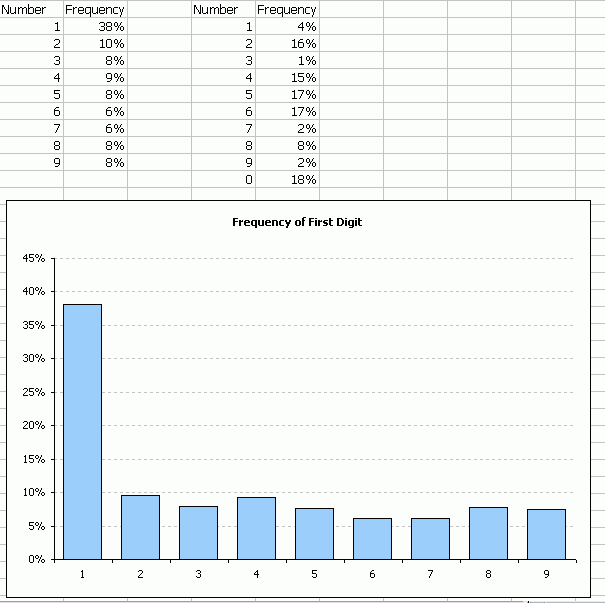
Not quite the smooth distribution I expected. The table on the right is the distribution of the right-most number. I just wanted to see how it would look. I expected it to be fairly even except I expected 9 to be higher since they’re prices.
Perhaps you misunderstood Benford’s Law. It requires that the first non-zero digit be used. So expecting to find lots of 9’s because you are analysing a price list, and hhave a number of items costing $xx.99 or $n99.00, is an incorrect interpretation of the data with respect to the law. This also means that you would count no zeros.
Benford’s Law applies to the first digit.
.00001 the first digit is 1
.0002 the first digit is 2
11 the first digit is 1
9999 the first digit is 9
Jay – Dick says he expects a lot of nines in the last digit.
When I see data like that, my first thing is to double-check. I hardly think to have a distribution like that. However Bendford’s law looks like specific. I need to go and have a look what it can be used for. anyway, Did you do a manual check?
An excel formula that extracts the first digit follows
=LEFT(REPLACE(TEXT(RxCy,”0.00000000E+00?),2,1,””),1)
Dick (hey ho!)
Appropriately applied, “Benford’s Law” a logarithmic distribution. Wikipedia has a reasonable explanation. For deeper insight, you know how to contact me.
Bruno – Those of us familiar with statistics, and full knowledge of conditioning parameters of “Benford’s Law” (i.e., typically PhD training in stats or decision analysis, with several years of experience post-doc), use it to check for bogus data. Financial records come immediately to mind; I can imagine its application to experimental observations reported by the pharma industry, or by other industries/corporations/organizations with an incentive to fudge “observations” (e.g., your local & Federal governments, the banking and auto industries, whatever).
Some years back I posted a macro for doing this correctly, along with a set of purely worksheet-based formulas for achieving same. I prefer the latter for most of the clients I deal with. If you cannot find them, then we can recreate them here.
Jon (another hey ho!) – Your comment puzzles me. Is Dick trying to get at “Benford’s Law”, or looking for something else? There is a ton of info in the marketing literature on price endings, from a behavioral-decision-analytic slant, and from other approaches. Best sources for further reading on current research are in academic journals (Marketing Science comes to mind, among several others). For more leads in this direction, write, and I can point you to a level of research you are comfortable with.
Regards to all,
Dave B
Save –
Man, I thought you’d disappeared.
Dick said he looked at the last digit (I guess since John had already looked at the first digit). Jay commented that he thought Dick had messed up. I was just saying that Dick looked at the last digit on purpose. He expected a lot of nines because lots of prices end in 9, which touches on behavioral decision analysis.
When I copy any cell by using “ctrl C” and want to paste in different cells, it allows me to do only one time.
2nd time again i have to press “ctrl C” and “ctrl v” for same cell.
Actually prices, as far as I know, don’t follow Benford’s distribution. So you shouldn’t even expect something Benford’s-like…
Hi Ieva
For some reason, your post keeps popping up on my computers. Sheesh. So I humbly respond to your post.
“Pricing”, per se, can be, of course, commercial, but is very, very often used within organizations for resource (re-)allocation. I like your focus on the original poster’s question: namely, a test of data he (incorrectly) applied an algorithm to.
“Pricing” and similar data-reporting run throughout any organization of more than, say, 50 or so employees. If I want to help them easily detect datasheet/accounting issues, I would never hesitate to run their accounting databases through a Benford distribution to look for data-manipulation. It is dirt cheap to do, fast – can help alert CEO’s to internal problems. It isn’t, to my knowledge, a great way to keep track of cow-paddies in your back acreage. I truly /am/ bummed to write how many times I see doctored data, and were we /not/ to use Benford-like distributions as a first pass, a lot of harm would be done to owners and investors, and, ultimately, to us as consumers. Quick, easy pass that’s hard to fake.
Regards,
Dave Braden
Regards to the gang.