I answer about four questions a month on the newsgroups. I’m off to a roaring start in April, but I don’t like my answer much. I never know just how “correct” an answer to give. So I gave an answer that I felt was appropriate for the original poster and I’ll give a slightly different answer here.
The OP has an external query pulling stock quotes from Yahoo! Finance. He’s using their csv download option, but just querying the csv rather than downloading it and loading it into Excel. One problem with that is that it puts all of the data in one column. If there’s a built-in way to fix that, I don’t know it. The other problem is that the list of companies he wants to see is variable and lives in a range of cells. I actually don’t know if these are his problems, but I like to pretend.
My objectives are to create a web query to Yahoo, add a parameter that points to a range, and parse the data into multiple columns. Does that sound like fun? Well, I’m doing it anyway.
I can’t create the query the old fashioned way. The web query user interface is like a browser; if you try to point to a CSV file, the browser wants to download it. So I create a web query to whatever table is on whatever page that happens to open up. Basically, I’m creating a query that I will later edit to point to where I want.
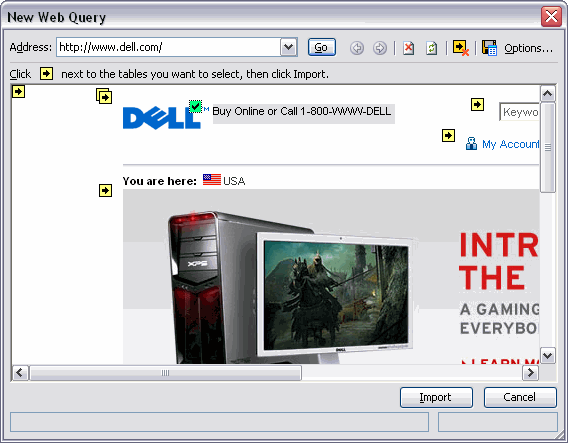
I pick any old arrow on the Dell website and create a query. I get a message that my query doesn’t return any data, but I just OK past that message because I know I’ll be making changes. Next I go to the VBE, and specifically the Immediate Window, to change my query.
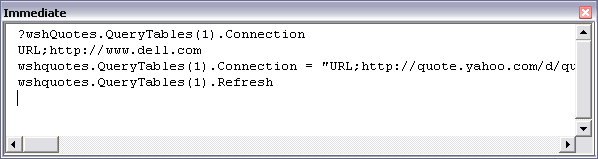
The part you can’t see says this:
If this URL isn’t exactly what you want, don’t worry. Alex has done all the legwork that will allow you to get whatever data you want. For me, I’m getting the name, last, and change for the S&P500 Index plus whatever else I enter. The “whatever else I enter” part is the parameter and is the name/prompt pair of strings inside the square brackets. When I Refresh the QueryTable, it asks me for a Ticker. I enter MSFT and the web query returns some data.
I have a parameter, but it doesn’t point to a range, so that’s next. The range B1:B10 will hold whatever ticker symbols I want and D1 will put them in the format I need for the URL.
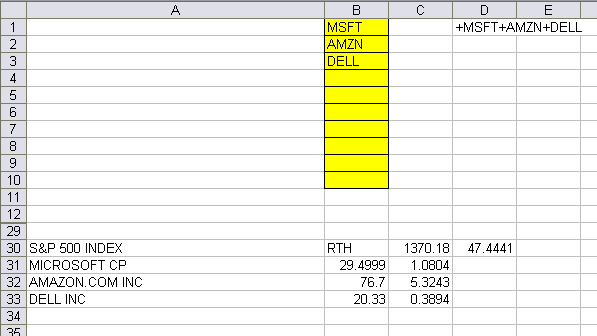
The formula in D1 is ="+"&B1&IF(NOT(ISBLANK(B2)),"+"&B2,"")&IF(NOT(ISBLANK(B3)),"+"&B3,"")&IF(NOT(ISBLANK(B4)),"+"&B4,"")
&IF(NOT(ISBLANK(B5)),"+"&B5,"")&IF(NOT(ISBLANK(B6)),"+"&B6,"")&IF(NOT(ISBLANK(B7)),"+"&B7,"")&IF(NOT(ISBLANK(B8)),"+"&B8,"")
&IF(NOT(ISBLANK(B9)),"+"&B9,"")&IF(NOT(ISBLANK(B10)),"+"&B10,"")
Inspiring, huh? If a ticker exists, it puts a “+” in front of it and adds it to the list. Now I can click on the Query Parameters button on the External Data Toolbar and point to D1.
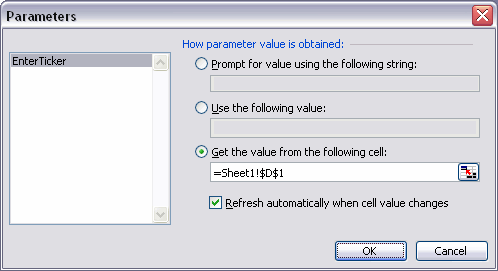
I also click on the Data Range Properties button and check the box to make the table automatically refresh.
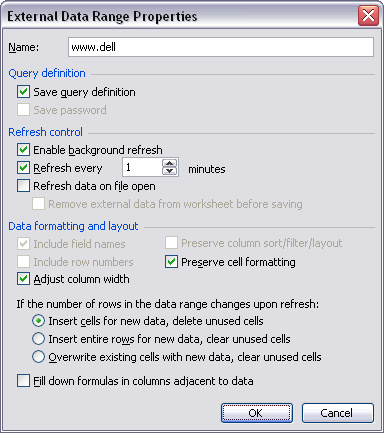
OK, I have a parameterized web query that refreshes automatically. Unfortunately, it gives me this
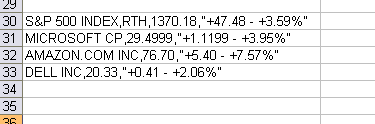
Everything in one column. Yuck. Time to get fancy. I know that Text to Columns will parse the results, but I’m not going to manually do that every time the QueryTable refreshes. Fortunately, QueryTables have events. Two events, to be precise. I’ll be using the AfterRefresh event. I’ll bet you can guess what the other one is.
Other than out brief jaunt into the Immediate Window, we’ve been pretty much in Excel’s UI up until now. It’s time to step through the looking glass into VBA and (gasp) class modules. Open the VBE (Alt+F11) and add a class module and a module to your project. Name the class module (F4) CQTEvents and name the module MEntryPoints. In your class module, put this code:
Private WithEvents mobjQTable As QueryTable
Private Sub Class_Terminate()
Set mobjQTable = Nothing
End Sub
Public Property Get QTable() As QueryTable
Set QTable = mobjQTable
End Property
Public Property Set QTable(objQTable As QueryTable)
Set mobjQTable = objQTable
End Property
Private Sub mobjQTable_AfterRefresh(ByVal Success As Boolean)
Application.DisplayAlerts = False
mobjQTable.ResultRange.TextToColumns _
Destination:=mobjQTable.ResultRange.Cells(1), _
DataType:=xlDelimited, _
TextQualifier:=xlTextQualifierDoubleQuote, _
Comma:=True
Application.DisplayAlerts = True
End Sub
Of course I never use public variables in a class because I’m a class module snob. So I have a private variable declared WithEvents that exposes the events of the QueryTable variable. Because it’s a private variable, I need public get and set statements so code outside of the class can access it. Finally, I create the AfterRefresh event (using the code pane drop downs) and simply call the TextToColumns method to parse out the QueryTable results. If you try to TextToColumns into a range that already contains data, you’ll get a message. I use DisplayAlerts to avoid that.
The only thing left is to tell my class which QueryTable I care about. I do that in the standard module with this code:
Public clsQTEvents As CQTEvents
Sub Auto_Open()
Set clsQTEvents = New CQTEvents
Set clsQTEvents.QTable = wshQuotes.QueryTables(1)
End Sub
Sub Auto_Close()
Set clsQTEvents = Nothing
End Sub
That’s so easy I don’t even have to explain it. Run Auto_Open and wait for your QueryTable to refresh. Then go fix your typos and you’re all set. And you thought class module were difficult. If you’re following along at home, be sure to do this during trading hours. Having those one minute updates where nothing changes isn’t too exciting.
Hello Dick,
pls refer to http://www.gummy-stuff.org/Yahoo-data.htm with good explanation and sample files for downloading Yahoo data in various columns as per your special tags (also shown in this explanation).
Regards,
Beate
Hmmm.. I like this but you could use this function instead of the formula in D1:
Function Ticker(List As Range) As String
Dim Item As Variant
Ticker = “”
For Each Item In List
If Application.WorksheetFunction.IsText(Item) Then
Ticker = Ticker & “+” & Item
End If
Next Item
End Function
Can this be used against google’s beta version people personal portfolio? This has been a great help.
Kevin – Yes, when you change your connection in the immediate window you need to use:
“URL;http://finance.google.co.uk/finance/portfolio?action=view&pid=1&pview=sview&output=csv“
I think there’s no parameter you can enter though. It depends on your existing profile.
Here is the update on using Google Finance (Beta). You can load “your” portfolio and pull the data as often as you like without the .csv conversion.
Range(“G25?).Select
With ActiveSheet.QueryTables.Add(Connection:= _
“URL;http://finance.google.com/finance/portfolio?client=ig&action=view&pid=1?, _
Destination:=Range(“A1?))
.Name = “portfolio?client=ig&action=view&pid=1_1?
.FieldNames = True
.RowNumbers = False
.FillAdjacentFormulas = False
.PreserveFormatting = True
.RefreshOnFileOpen = False
.BackgroundQuery = True
.RefreshStyle = xlInsertDeleteCells
.SavePassword = False
.SaveData = True
.AdjustColumnWidth = True
.RefreshPeriod = 0
.WebSelectionType = xlSpecifiedTables
.WebFormatting = xlWebFormattingNone
.WebTables = “””pview_t”””
.WebPreFormattedTextToColumns = True
.WebConsecutiveDelimitersAsOne = True
.WebSingleBlockTextImport = False
.WebDisableDateRecognition = False
.WebDisableRedirections = False
.Refresh BackgroundQuery:=False
Caveat for my prior submission that formatting may need work if pulling stocks that are listed on non-US based exchanges….
New-bee question here. I have been trying to get this to work but I seem to be having some troubles.
I can not for the life of me find the query parameter buttom on the external button where is it?
Also in the first part it states to go into the immediate window and try that script. I get error messages after every time I return. Is this normal?
I am running Excel 2007
Thanks
Blair,
Does anyone know if this method can be used to extract info from .csv/.txt files on a (passworded) ftp site?
Blair – not sure about the button on ’07 but for the immediate window try replacing: wshquotes.QueryTables(1)
with
Thisworkbook.Activesheet.QueryTables(1)
you can also use Financial Link for Excel to load updating stock quotes, financial statements, estimates, price histories into Excel. Easy-to-use formulas to load the data and also wizards to help you creating the formulas.
More detailed information here:
http://www.xlconsulting.net/flink.php
I am a new to macros and need to compile multiple data streams into an excel spreadsheet using a Web Query.
I tried to record the macro but it never accounts for changing symbols as I update the stocklist periodically.
What I need to know is how can I import Earnings, Fundamental and earnings Release Date Date from the web and occupy the columns with the correct data.
I know I need to create a loop as there are 75 symbols and 11 columns that need updating line by line from the web.
I also need the Macro to undertand that it needs to update the specific cells chosen with the corresponding ticker symbol.
As I mentioned above, I recorded a macro and later on I resorted the same ticker symbols alphabetically but found the wrong earnings release dates in the wrong cells.
I have concluded that I cannot just record a macro as there are more steps involved.
Does anyone have any experience with what I am looking to do?
Cheers!
Take a look at my add-in (click on the link on my name).
I originally wrote the add-in functions because of frustrations I had with EXCEL Web Queries. The add-in is open-source, so you can play around with the code if you want.
The add-in, documentation on its functions, and sample templates can be found in the files area of the Yahoo Group the link will bring you to.
For example, you can use an array-entered formula like:
=RCHGetYahooQuotes(A2:A100,B1:M1)
…where the A2:A100 range contains the ticker symbols and the B1:M1 range contain the codes that tell Yahoo what you want returned. For example, “l1? would indicate you want the last traded price, “o” would indicate you want the day’s opening price, etc.
Another function can be used to grab other fundamental data. For example:
=RCHGetElementNumber(“MMM”,945)
…would get you the “Forward PEG ratio” for ticker “MMM” from Yahoo’s Key Statistics page.
There’s also a macro (smfUpdateDownloadTable) where you can create a column of stock tickers and a row of element definitions — run the macro and it will fill in the table based on your column and row definitions. For example, just entering 945 as a row header item would cause the “Forward PEG ratio” above to be retrieved for each ticker in the table you create.
Wondering if it would be possible to use the statement Thisworkbook.Activesheet.QueryTables(1) for more than one query per sheet … Anyone has an idea ?
The Thisworkbook.Activesheet.QueryTables.Refresh doesn’t work well in this instance !!
Thanks
I don’t think so Frank. You can use
.
Trying something similar – I have the Google Finance data updating into my excel sheets, no problem.
When I try to perform a VLOOKUP against the web data, I’m getting #N/A
(I’m trying to use Symbol column to match up data from a different non-dyanmic source.)
The formula doesn’t seem to recognize the symbol column values. If I manually overwrite the symbol name into the web data cells, the VLOOKUP works properly.
Any suggestions?
I have the web query working OK and can get stock quotes data.
How do I make it go into a new cell on the next day , so I can save the historical data?
mcb
MCB: http://www.dailydoseofexcel.com/archives/2004/08/17/graphing-web-data/
I’ve just been messing around with web queries Yahoo Finance in Excel 2010, and can’t get it to work. Has anyone had success?
I ended up using the spreadsheet at http://optimizeyourportfolio.blogspot.com/2011/05/importing-historical-stock-prices-from.html to download from Yahoo Finance
That Yahoo stock quote worksheet is now here: http://investexcel.net/218/importing-historical-stock-prices-from-yahoo-into-excel/