This one comes from my old buddy Harald, who will be sorely missed at this year’s summit.
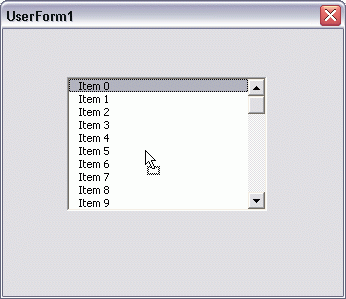
This code allows you to reorder items in a Listbox by dragging and dropping them. Similar code in another Listbox could be used to drag items between controls, but that is not shown here. The only thing I’d like to see is some visual indicator of where I’m dropping the item. In the time I spent with this, I just wasn’t able to come up with anything.
|
1 2 3 4 5 6 7 8 9 10 11 12 13 14 15 16 17 18 19 20 21 22 23 24 25 26 27 28 29 30 31 32 33 34 35 36 37 38 39 40 41 42 43 44 45 46 47 48 49 50 51 52 53 54 55 56 57 58 59 60 61 62 63 64 65 |
Private mobjFromList As MSForms.ListBox Private mlFrom As Long Private Sub UserForm_Initialize() Dim L As Long For L = 0 To 50 Me.ListBox1.AddItem "Item " & L Next End Sub Private Sub ListBox1_MouseMove(ByVal Button As Integer, _ ByVal Shift As Integer, _ ByVal X As Single, _ ByVal Y As Single) Dim objData As DataObject Dim lEffect As Long Const lLEFTMOUSEBUTTON As Long = 1 If Button = lLEFTMOUSEBUTTON Then Set objData = New DataObject Set mobjFromList = Me.ListBox1 objData.SetText Me.ListBox1.Text mlFrom = Me.ListBox1.ListIndex lEffect = objData.StartDrag End If End Sub Private Sub ListBox1_BeforeDragOver(ByVal Cancel As MSForms.ReturnBoolean, _ ByVal Data As MSForms.DataObject, _ ByVal X As Single, _ ByVal Y As Single, _ ByVal DragState As MSForms.fmDragState, _ ByVal Effect As MSForms.ReturnEffect, _ ByVal Shift As Integer) Cancel = True Effect = fmDropEffectMove End Sub Private Sub ListBox1_BeforeDropOrPaste(ByVal Cancel As MSForms.ReturnBoolean, _ ByVal Action As MSForms.fmAction, _ ByVal Data As MSForms.DataObject, _ ByVal X As Single, _ ByVal Y As Single, _ ByVal Effect As MSForms.ReturnEffect, _ ByVal Shift As Integer) Dim lTo As Long With Me.ListBox1 lTo = .TopIndex + Int(Y * 0.85 / .Font.Size) If lTo >= .ListCount Then lTo = .ListCount Cancel = True Effect = fmDropEffectMove .AddItem Data.GetText, lTo If mobjFromList = Me.ListBox1 And lTo < mlFrom Then mobjFromList.RemoveItem (mlFrom + 1) Else mobjFromList.RemoveItem mlFrom End If Set mobjFromList = Nothing End With End Sub |
Harald, who will be sorely missed at this year’s summit.
Remember last time how we talked about him coming anyway, even though he resigned his MVP-ship? He could just show up in Seattle and spend each night with a different person. That way he gets most of the benefits of the MVP Summit (free hotel, camaraderie with other Excel geeks, lots of drinking), without actually having to attend the sessions.
What do you say, Harald?
That is a very tempting idea, but I just can’t make it this year. Hopefully there’s a new chance in 2008.
I have some code in C# for an Excel Addin that gives a visual indication of dragging items. It could reasonably simply be converted to VB. Let me know if you interested.
Andrew
Andrew: I’d love to see that code.
The strange thing here was that I am not able to select the new dropped listindex in the end of the drop event, code ran but it just stayed on the initial listindex. The dragover event did calculate the potential drop position and tell in a label or so, but the listbox itself refuse to be interrupted. So yes, please let me see the code.
The multiplication of the Y co-ordinate by 0.85 to get the insertion index becomes a little sketchy when used with different font sizes and longer listbox controls. Seems to work better if you assume 2.25 points are added to the font size to acquire the full height of the listbox entry.
So lTo = .TopIndex + Int(Y / (.Font.Size + 2.25))
Pete.
When I try to run this I actually get a “DataObject:SetText Invalid Argument” error. Is there a specific reference I need for this to run?
Scott: No, as long as you have a userform, you should automatically get a reference to the Forms library. It sounds like Me.Listbox1.Text is returning something weird – like null.
I was playing around with this just today. Finally figured out what was causing the DataObject:SetText error: if you use this little bit poetry with a listbox, you must make sure that the listbox mutliselect is set to Single. Anything else will cause an error.
Just thought I’d update my own comment…
Is there a way to change this code so it would work when the listbox multiselect value is set to multi?
I have a listbox containing checkboxes beside items. I’d like to be able to drag and drop to reorder the list of selected items, before inserting them into a spreadsheet.
Hi Dick, for a visual of where the item is going to be dropped I run something similar to this code:
Option Explicit
Dim intDropIndex As Integer
Const intListSize As Integer = 15
‘
‘
‘
Private Sub lbxInGroup_BeforeDragOver(ByVal Cancel As MSForms.ReturnBoolean, ByVal Data As MSForms.DataObject, ByVal X As Single, ByVal Y As Single, ByVal DragState As MSForms.fmDragState, ByVal Effect As MSForms.ReturnEffect, ByVal Shift As Integer)
Dim strItemToAdd As String
Dim intItemCounter As Integer
Dim intTopIndex As Integer
Cancel = True
Effect = fmDropEffectMove
If Y = 0 Then Exit Sub
strItemToAdd = Data.GetText
intTopIndex = lbxInGroup.TopIndex
intDropIndex = intTopIndex + Application.Min(Application.RoundDown((Y / lbxInGroup.Height) * intListSize, 0), lbxInGroup.ListCount – 1)
If intDropIndex = intTopIndex And intDropIndex > 0 Then
intTopIndex = intTopIndex – 1
ElseIf intDropIndex = intTopIndex + intListSize – 1 And intDropIndex lbxInGroup.ListIndex Then
lbxInGroup.AddItem strItemToAdd, intDropIndex + 1
lbxInGroup.RemoveItem lbxInGroup.ListIndex
lbxInGroup.ListIndex = intDropIndex
ElseIf intDropIndex < lbxInGroup.ListIndex Then
lbxInGroup.RemoveItem lbxInGroup.ListIndex
lbxInGroup.AddItem strItemToAdd, intDropIndex
lbxInGroup.ListIndex = intDropIndex
End If
lbxInGroup.TopIndex = intTopIndex
End Sub
‘
‘
Private Sub lbxInGroup_BeforeDropOrPaste(ByVal Cancel As MSForms.ReturnBoolean, ByVal Action As MSForms.fmAction, ByVal Data As MSForms.DataObject, ByVal X As Single, ByVal Y As Single, ByVal Effect As MSForms.ReturnEffect, ByVal Shift As Integer)
Cancel = True
Effect = 0
End Sub
‘
‘
Private Sub lbxInGroup_MouseMove(ByVal Button As Integer, ByVal Shift As Integer, ByVal X As Single, ByVal Y As Single)
Dim dobDataObject As DataObject
Dim intEffect As Integer
If Button = 1 Then
Set dobDataObject = New DataObject
dobDataObject.SetText lbxInGroup.Value
intEffect = dobDataObject.StartDrag
End If
End Sub
‘
‘
‘
Private Sub UserForm_Initialize()
Dim i As Integer
For i = 1 To 18
lbxInGroup.AddItem “Item ” & i
Next i
End Sub
It’s a pretty roughly cut down version of the code I’m actually using, but you get the idea!
Hello Simon,
I am trying out your code.
I get some pretty weird behaviour though.
I wonder if I need to use a particular font?
any chance you could send me an xls example?
email brigzy@ntlworld.com
Cheers
Richard
What would be useful to me, is Dick Kusleika’s original code converted to acting on a multi-column Listbox. In my case I have two columns.
Here’s code that will work on 2 columns. It uses a pipe (|) as a delimiter but you may want to use something else if you data contains pipes.