Created by David Hager
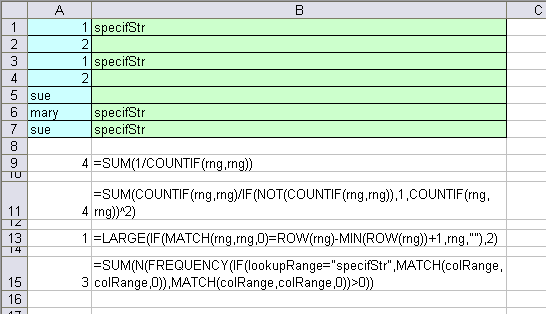
This array formula returns the number of unique items in a worksheet range.
However, if Rng contains blank cells, this formula returns an error. In this case, use this modified version of the formula.
This array formula returns the Nth largest unique value in a column range.
To apply data validation to a column which allows only unique items to be entered, highlight that column and select Data, Validation from the menu. Choose the custom option and enter the following formula (for column A):
Created by Laurent Longre
This formula counts the number of unique items a column range, only if the cells in the lookup range contain the specified string.
Editor’s Note:
rng = A1:A7
colRange = A1:A7
lookupRange = B1:B7
Don’t forget to enter those array formula with Control+Shift+Enter, not just Enter.
Similar to David’s first formula, but I normally use the following to count unique records in a set range:
{=SUM(COUNTIF(RANGE,RANGE)/(COUNTIF(RANGE,RANGE)^2))}
I am new to array programming. Can anyone kindly explain how the following works
I try to figure out myself. However, I always get 1 for ROW(RNG) instead of an array
Why we need MIN(ROW(RNG))+1? I thought MIN(ROW(RNG)) will always be 1
This array formula returns the Nth largest unique value in a column range.
=LARGE(IF(MATCH(Rng,Rng,0)=ROW(Rng)-MIN(ROW(Rng))+1,Rng,””),N)
The formula
=COUNTIF($A$1:A1,A1)=1
works by entering data. If you copy the data from another cell Control+C and paste it Control+V to the Column A (subject to data validation), it will be pasted and data validation will be bypassed!
Question: How to implement proper data validation? Ensuring that either way Data Entering and/or Copy-Pasting will be validated.
Thanks,
Tennor
In the last array formula by Laurent Longre it is worth noting that this formula will only work when there are no blank cells in colrange.
One way around this if you have blank cells at the end of the range is to use ozgrids expanding ranges (http://www.ozgrid.com/Excel/DynamicRanges.htm)
Does anyone know how to make it work if the blank cells are in the middle of the range?
Thanks,
Matt
I am trying to validate a column so that it will send an error alert when 07……..telephone numbers and 09…….. telephone numbers are entered into the column. I am a bit confused about the custom formula to validate this cell. can you help
Natasha: Are 07 and 09 country codes? Can you give some examples of phone numbers that should give the alert?
Natasha,
I assume your trying to catch mobile phone numbers (beginning 07…) and premium rate lines (beginning 09…).
Make sure your phone number column is formatted as text.
Apply the following custom formula in data validation
=AND(LEFT(cell_ref,2)”07?,LEFT(cell_ref,2)”09?)
and add the appropriate warning in your Error Alert.
Brian
Oops! There should be “not equal” signs after the last bracket for each LEFT function. Soz.
Data Validation:
Is it possible to apply the =COUNTIF($H$1:H1,H1)=1 across many worksheets? I have split an asset register across many worksheets and I would like it to check that the serial number does not exist in any worksheet. Is that possible?
Thanks
Paul
Hi
I need help in counting the unqiue records,
Column
Device TypeDevice Model
MFP Canon NP 6050
PrinterHP Color LaserJet 2500N
PrinterHP Color LaserJet 4600n
PrinterHP LaserJet 1010
PrinterHP LaserJet 4000
PrinterHP LaserJet 4050
PrinterHP LaserJet 4100N
PrinterHP LaserJet 4200N
PrinterHP LaserJet 4200N
PrinterHP LaserJet 4200N
PrinterHP LaserJet 4200N
Fax Panasonic AnyModel
MFP Canon NP 6050
PrinterHP Color LaserJet 2500N
PrinterHP Color LaserJet 2550N
PrinterHP Color LaserJet 3700N
this is my data, now i need to if count unique record in cloumn device model where device type is printer.can some one please help me,
Hi Hima : is it that you are tying to count number of times a particular printer has appeared in the list?
=LARGE(IF(MATCH(C7:C15,C7:C15,0)=ROW(C7:C15)-MIN(ROW(C7:C15))+1,C7:C15,””),3)
this didnt work