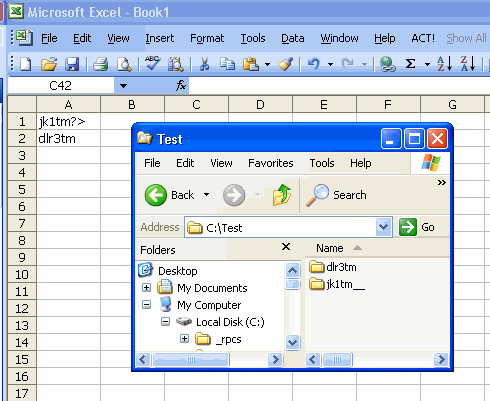
Scott wants to create folders based on the information in certain cells. I suggest the MkDir function.
Check out the line below “Make sure base folder exits”. Is that the best way to do that. For some reason I thought there was a problem with that method, but I can’t think of what it was.
Sub StartHere()
Dim rCell As Range, rRng As Range
Set rRng = Sheet1.Range(“A1:A2”)
For Each rCell In rRng.Cells
CreateFolders rCell.Value, “C:Test”
Next rCell
End Sub
Sub CreateFolders(sSubFolder As String, ByVal sBaseFolder As String)
Dim sTemp As String
‘Make sure the base folder is ready to have a sub folder
‘tacked on to the end
If Right(sBaseFolder, 1) <> “” Then
sBaseFolder = sBaseFolder & “”
End If
‘Make sure base folder exists
If Len(Dir(sBaseFolder, vbDirectory)) > 0 Then
‘Replace illegal characters with an underscore
sTemp = CleanFolderName(sSubFolder)
‘See if already exists: Thanks Dave W.
If Len(Dir(sBaseFolder & sTemp)) = 0 Then
‘Use MkDir to create the folder
MkDir sBaseFolder & sTemp
End If
End If
End Sub
Function CleanFolderName(ByVal sFolderName As String) As String
Dim i As Long
Dim sTemp As String
For i = 1 To Len(sFolderName)
Select Case Mid$(sFolderName, i, 1)
Case “/”, “”, “:”, “*”, “?”, “< “, “>”, “|”
sTemp = sTemp & “_”
Case Else
sTemp = sTemp & Mid$(sFolderName, i, 1)
End Select
Next i
CleanFolderName = sTemp
End Function
Dim rCell As Range, rRng As Range
Set rRng = Sheet1.Range(“A1:A2”)
For Each rCell In rRng.Cells
CreateFolders rCell.Value, “C:Test”
Next rCell
End Sub
Sub CreateFolders(sSubFolder As String, ByVal sBaseFolder As String)
Dim sTemp As String
‘Make sure the base folder is ready to have a sub folder
‘tacked on to the end
If Right(sBaseFolder, 1) <> “” Then
sBaseFolder = sBaseFolder & “”
End If
‘Make sure base folder exists
If Len(Dir(sBaseFolder, vbDirectory)) > 0 Then
‘Replace illegal characters with an underscore
sTemp = CleanFolderName(sSubFolder)
‘See if already exists: Thanks Dave W.
If Len(Dir(sBaseFolder & sTemp)) = 0 Then
‘Use MkDir to create the folder
MkDir sBaseFolder & sTemp
End If
End If
End Sub
Function CleanFolderName(ByVal sFolderName As String) As String
Dim i As Long
Dim sTemp As String
For i = 1 To Len(sFolderName)
Select Case Mid$(sFolderName, i, 1)
Case “/”, “”, “:”, “*”, “?”, “< “, “>”, “|”
sTemp = sTemp & “_”
Case Else
sTemp = sTemp & Mid$(sFolderName, i, 1)
End Select
Next i
CleanFolderName = sTemp
End Function
Dick,
You should check for the folder’s existence after you clean the illegal characters. Otherwise, you run the risk of trying to create a folder that already is there.
David
Best Approach is the one used in ASAP utilities – Create a lot of folders easily.
The only problem is that the Make folder dialog always points to the MyComputer during start up… It would be nice if it would “remember” the last place path you created the folder … that would have
Sam
‘ The first line of this snippet should use the vbDirectory parameter ohterwise if a folder does
‘ not contain any files it will not return a string value and will give a false indication of the
‘ folder existance. To be sure to detect a directory…
‘ Use this: If Len(Dir(sBaseFolder & sTemp, vbDirectory)) = 0 Then
‘ Or this: If Len(Dir(sBaseFolder & sTemp, 16)) = 0 Then
‘ This will not detect a directory unless it contains a file.
If Len(Dir(sBaseFolder & sTemp)) = 0 Then
‘Use MkDir to create the folder
MkDir sBaseFolder & sTemp
End If
‘ I adapted the Procedure to create multiple new directories if not existing
‘ It uses a loop to check each directory and create it if not existing.
Sub CreateFolders(sFolderPath As String)
Dim sSubFolder As String
Dim sBaseFolder As String
Dim sTemp As String
ArryDir = Split(sFolderPath, “”)
For i = 0 To UBound(ArryDir) – 2
sBaseFolder = sBaseFolder & ArryDir(i)
sSubFolder = ArryDir(i + 1)
‘Make sure the base folder is ready to have a sub folder
‘tacked on to the end
If Right(sBaseFolder, 1) “” Then
sBaseFolder = sBaseFolder & “”
End If
‘Make sure base folder exists
If Len(Dir(sBaseFolder, vbDirectory)) > 0 Then
‘Replace illegal characters with an underscore
sTemp = CleanFolderName(sSubFolder)
‘See if already exists: Thanks Dave W.
If Len(Dir(sBaseFolder & sTemp, vbDirectory)) = 0 Then
‘Use MkDir to create the folder
MkDir sBaseFolder & sTemp
End If
End If
Next
End Sub
Private Function CleanFolderName(ByVal sFolderName As String) As String
Dim i As Long
Dim sTemp As String
For i = 1 To Len(sFolderName)
Select Case Mid$(sFolderName, i, 1)
Case “/”, “”, “:”, “*”, “?”, “”, “|”
sTemp = sTemp & “_”
Case Else
sTemp = sTemp & Mid$(sFolderName, i, 1)
End Select
Next i
CleanFolderName = sTemp
End Function
Change: Existance to “non-existance”
‘will give a false indication of the
‘ folder non-existance. To be sure to detect a directory…
Change: -2 to -1 in For Next
For i = 0 To UBound(ArryDir) – 1
I want make a MkDir with variabele name of dir.
How can I make it in Excel vba.
And I will make a folder in Excel vba.
I com from Dutch my englisch is not zo good.
[…] = Nothing End Sub Sub CheckAndCreateFolders(sFolderPath As String) ‘ 14/11/2008, sourced from: _ Daily Dose of Excel » Blog Archive » Creating Folders With MkDir Dim sSubFolder As String Dim sBaseFolder As String Dim sTemp As String Dim ArryDir Dim i As Long If […]
The simplest way to create (sub)folders, provided the ultimate parentfolder (‘Namespace’) exists:
Sub M_snb()CreateObject("shell.application").Namespace("G:").NewFolder "OF\AA1\BB2"
End sub
In this example the folders
G:\OF
G:\OF\AA1 and
G:\OF\AA1\BB2
will be created in 1 go.
If drive G: exists there's no need to chek the existence of any other folder.
So the namespace can refer to a dreve, a rootfolder or any other existing folder.