A few weeks ago I came across a post on the blog of Eric W. Bachtal. He has written an Excel Formula Parser in Javascript. All I could think was.. WOW!
If you haven’t seen it yet, you should click here
I’ve always wanted to build a fully blown expression parser but didn’t really know where to start.
There is some great information in that post – the extra reading was helpful too.
So, I set about writing my own in VBA using the points and methods learned from that post. There sure are a lot of things to think about. Here is some of the trickery I encountered…
A formula parser-tokeniser is not very useful unless you do something with it – so I’m starting with something simple:
An add-in for formatting and editing a formula. I think they call it a ‘beautifier’.
Do a search on this website for “ugly formula” and you’ll see where this tool might be handy.
I intend to build more around the add-in as time permits. Perhaps an advanced search/replace tool? FindLinks? MultiWkb/MultiSheet Precedents grapher? Who knows.
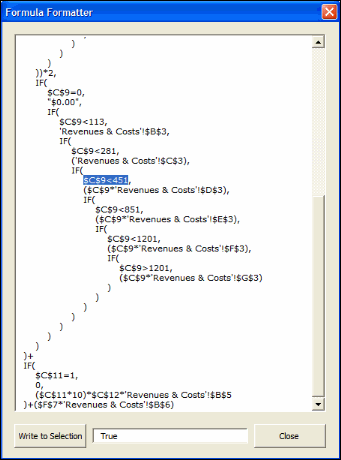
I tried my best to accept International Regional Settings – no guarantees there.
F9 will evaluate a portion of the formula too.
It’s still beta as version 0.9.
Download AudXL.zip from my website: http://www.vangelder.co.nz/excel
This is great – nice job! I’ll be loading this on startup from now on, and looking forward to version 1.0!
Great job Rob !
I really like what you did. I’ll try it one some ugly formulas to see how it does :)
That looks interesting indeed.
It might come in handy in combination with my Name manager too. (www.jkp-ads.com/OfficeMarkerPlaceNM-EN.htm)
Would using the treeview control be an idea?
Hi Rob,
Found the first (little) problem: If the formula it long and hence doesn’t fit in the textbox, the vertical scroll bar doesn’t show automatically so it looks as if you can only view a part of the formula.
Suggestions:
1. Make the form resizable.
2. Use tooltips
Questions:
1. If I edit the formula in the textbox, when will it update to the cell(s)?
2. What is the empty textbox at the bottom for?
Is there a utility that will do the reverse? That is turn VBA macros into formulas?
This is cool! :-D
JK: The Textbox scrollbar problem. I’ve seen it, I can’t work it out to fix. I may have to work around. The treeview is an option.
The textbox at the bottom contains status messages and the results of pressing F9 on the whole or part of the formula.
I don’t really want to touch Names just yet. Your Name Manager add-in is an excellent, polished, mature product. Anything I write would simply be imitation. That said, I’ll likely bring in Names formulas as an option.
Doco: What you are suggesting doesn’t sound like a huge leap from what is already there. I’ll sleep on it.
Cheers,
Rob
Hi Rob,
I was thinking in the direction of vastly improving the analyse name dialog that’s currently in the Name Manager, which has a very crude parser. Maybe we could include (some of) your logic into the NM.
I wasn’t suggesting you to rewrite the NM .
Had a reason to use this tonight and noticed that the “Write to Selection” button is dropping the quotes around literal text tokens.
I’ll second the suggestion above regarding a treeview. I think that would be a great presentation mechanism.
Also, thanks for the tip on the JKP name manager. Looks like a real time saver. Can’t wait to try it out.
Doco: I just re-read that comment – VBA to Formulas. No thanks :)
Rob,
Very nice add-in to have when tracing errors!
However, if you select part of the formula and CTRL + you get strsnge behavior: instead of evaluating the selected item, you toggle between normal and a very small font. Evaluating the selected item would be more useful.
I would like to look at the code – what is the project password?
Eric: a new version will be updated later today (NZST)
Jan Karel: I played with the TreeView last night. It looks sexy but it didn’t allow multiline selection. I’ll stick with Textbox.
I did manage to get resizable forms. I thought it would be more difficult!
Yes, there may be opportunity to enhance your Name Manager. I’ll take a closer look.
Michael: F9 allows selection evaluation.
I may password unprotect, but I want to wait until some of these issues are ironed out. Theres nothing more annoying than dud source code floating around.
Cheers,
Rob
Hi.
I uploaded version 1.00 to my website this evening.
It resolves a couple of bugs and introduces a general token viewer.
The token viewer takes a range selection (over one or more selected worksheets) and presents a list of token values and token types.
Handy for identifying functions, external workbooks/worksheets, 3d ranges, string occurences, etc…
Click the column headings for sorts.
Doubleclick a row to jump to that formula.
Cheers,
Rob
Rob,
Brilliant tool! I’ve been using it almost daily for about a year. Thanks!
One s-m-a-l-l suggestion: I didn’t know until stumbling across this page that F9 would evaluate the selected text. Very cool! Knowing that would have saved me hours in my last formula debugging marathon. So maybe include a tooltip or better yet a caption under the textbox at the bottom of the Formula Formatter saying, “(F9 to evaluate selection)”. Please :)
Thanks again, you rock!
Dave
When I eventually get around to purchasing Office 2007, I’ll look at producing a compatible formula formatter. At that point I’ll introduce changes as you suggest.
Cheers,
Rob
I have encounter some problems and wondering if anyone of you who can help me or not. My questions are:
How can I represent EDI file format in microsoft excel?
Or
How can I convert a number e.g. 1.33 to 000000000001.33 (length =15) in mircrosoft excel format?
Thanks!
Hi Jason,
You need to create a custom number format. To do this, select a cell, then go to Format->Cell->Number tab. From the various options available in the “Category” box, select “custom”. Now on the right in the “Type” box, write
000000000000.00 and click “Ok”. Now if you type 1.33 in that cell, it will display 000000000001.33
Regards
Kanwaljit
Hi, I am working on a library in C++, which will be used to create excel based reports. Initially a report template will be created in excel and saved as xml. Then the programmer will simply fill the data into respective rows/columns in the program. This library will allow the programmer to load the xml template and manipulate the related objects (elements), which includes adding sheets, defining styles, adding/deleting columns, rows and cells etc. Then the output is again saved to a xml file, which can be again opened in excel.
I am almost done with the other things. Now important thing I need to do is normalize the formule i.e. when a row/column is deleted or insrted affected formule should be changed as they are done in excel application.
I was wondering if there is any c++ class, which could read the formula and allow the changes, and then reconstruct the formula string.
Thanks & Regards,
Joga
Joga:
There are two notations used for referencing ranges. A1 and R1C1.
Most Excel users work in A1. Excel itself works in R1C1. Try using R1C1, and see if that helps your app.
For example, I have a formula in C1: =B1*0.5
Then I insert a column at A:A
The fomula now reads =C1*0.5
However, in R1C1 reference style, the formula doesnt change: =RC[-1]*0.5
(Tools > Options General > R1C1 reference style)
Cheers
Rob
Thanks Rob. I think in Excel xml, it is always in RC format. Am I right? Here the problem is that the templat excel files will be created by the end users. So my library should adapt to whatever the format they have used.
Rob,
Where’d your website disappear to?
My website is having issues.
If you are looking for the Excel Add-in for Formula Formatting, click this link
Rob,
this looks great. However, I’m unable to download.
thanks,
Mark
Great stuff!
I stumbled upon these pages looking for an Excel formula parser I could use in VBA.
I am developing an Add-In application that extracts/replaces from a cell’s formula only the custom function that is provided in the Add-In. In this way I can generate workbooks that do not need my Add-In anymore.
For instance I have [A2].Formula = “=TRIM(MyCustomFunction(“Param1?, Param2, Param3))”. I want to keep “=TRIM(…)” and replace “MyCustomFunction(“Param1?, Param2, Param3)” with the value (using Application.Evaluate().
Excel does have a context sensitive parser built-in -you can see this when you edit a formula on the formula bar and navigate the entry, Excel provides a nice tooltip and marks/colours the round brackets- but unfortunately it is not available in VBA (presumably).
Moreover, I’ve seen that Excel, apart from some rudimental syntax check -a formula must start with “=” in the first position and any formula must have the “(” right after the name- also accepts a large amounts of totally useless white spaces. For instance, these 2 formulas are perfectly legal: “= TRIM(A2)” and “= TRIM( A2 )” ).
Being so, I started to work out a solution but too many exceptions arose. Hence the search on the Internet.
Now my request is this: as your code does more or less what I am looking for, can I use [part of] your code to implement a routine that explores the cell’s formula for the functions provided by my Add-In? I do not need some of the overhead and also want to avoid that people need to install the “AudXL” in order to be able to use my Add-In.
Many thanks.
See RefTreeAnalyser for Excel: Excel formula auditing taken to the next level! Provided by: JKP Application Development Services.
Some people have tried a BNF for Excel but it’s difficult.
Operis went to a lot of trouble for their OAK addin to parse Excel formulas.
In your case, you might need to handle nested formulas with quotes, commas etc
MyCustomFunction(Left(“Param” & A1, 10), MyCustomFunc2(“this”,that)+Param2, len(indirect(Param3)))
which requires creating a stack –
unless of course you make simplifying assumptions.
Just found also:
http://ewbi.blogs.com/develops/2004/12/excel_formula_p.html
http://chriscavanagh.wordpress.com/2009/02/19/custom-expressions-and-the-dlr-part-1/
and part 2
Patrick,
I’ve seen the sites you are mentioning, also interesting but not my aim.
I can indeed make some assumptions to the formatting of my custom functions as these are generally generated by the Add-In during a range fill via VBA code. And what about inserting the custom function *inside* string delimiters? A simple VBA.Mid$() would not identify this.
If I am unable to parse correctly, as the last resort I read the cell’s value (usually .Value, but could also take .Value2 or .Text, it doesn’t really matter), I remove the entire formula from the cell and write back the static value to the cell. Btw, I’ve already been forced to do so because of a quirk in Application.Evaluate(): this internal function fails with error 2015 when the evaluated function’s return is a string with more than 255 characters (see my blog for details).
My reply contained an enquiry towards Ron de Bruin asking him permission to use [part of] the code in his AudXL Add-In to embed in my Add-In so I do not have to write a parser myself.
Dutch
“I can indeed make some assumptions to the formatting of my custom functions as these are generally generated by the Add-In during a range fill via VBA code. “
In that case, you could use generate the formulas surrounding them with unique flag markers like
(((MyCustomFunction(…whatever))))
and s&r for what’s inside ((( and )))
as ((( could be present with nested IFs, you’ll need to think more about something specific.
By Ron de Bruin did you mean Rob van Gelder?
I might ask Rob & JKP myself, as a formula parser would be handy for me too.
Thanks for the tip on application.evaluate string limit, I’ll check that.
P.
Yes, sorry, it was Rob Van Gelder. Ron de Bruin is another guy but also an excellent Excel expert
The “(((” trick could be used as long as I was processing a workbook made by myself, but since I have no control on what others do with my Add-In, this is not usable.
My Add-In generates cell formulas with only my custom function inside, but this function may return strings with embedded vbCrLf’s etc. With a little manipulation, using =SUBSTITUTE() and =TRIM(), I reformat the original strings and polish the final visual.
For the Application.Evaluate() you can do a very quick test by doing the following:
1) put this function in [A1] = “=REPT(“a”,255)” and this one in cell [A2] = “=REPT(“a”,256)”
2) from VBE, type “? Application.Evaluate([A1].Formula)”
3) do the same for “? Application.Evaluate([A2].Formula)”
or
2a) from VBE, type “[B1].Value = Application.Evaluate([A1].Formula)”
3a) do the same for “[B2].Value = Application.Evaluate([A2].Formula)”
Dutch
Just seen, have not tried:
http://support.microsoft.com/kb/213841
January 24, 2007 – Revision: 4.5
Passed strings longer than 255 characters are truncated in Excel
http://www.dailydoseofexcel.com/archives/2006/02/17/registering-a-user-defined-function-with-excel/
keepITcool says:
February 22, 2006 at 7:29 am
My “trick” used to circumvent the 255 character limit is all based on storing the argument values in Excel’s “Global namespace”. (Laurent Longre uses the term “Hidden Namespace”). These names exist at application level and can be reached by all workbooks and addins using SET.NAME and GET.NAME macro functions
Note the “trick” also works very well with the Evaluate method, which has a similar 255 char limit..
Could not understand from the readings how to use the Global Namespace for the Evaluate problem I’m facing, maybe you can throw a beam of light on it.
In the meantime I’m rewriting the VBA for a formula scanner that extracts the string I need from the cell’s formula, as I’m not interested in anything else. And as the Add-In contains the atoms (i.e. my custom UDF’s), I can obtain the desired value without using Application.Evaluate() and thus without the 255 limit.
Dutch
I got the 255 limit for Evaluate function as well. Could you show us your “trick” to circumvent the 255 character limit? Thanks.
You’ll have to ask Jurgen Volkerink aka keepITcool directly, I have not looked it up.
P.
I was unable to download this. Is it still available?
It is still available: http://vangelder.orcon.net.nz/excel/audxl.html
I have an Excel 2007 version at 90% complete – it fixes a number of issues and handles Tables[]
Once complete, I’ll post again.
Cheers,
Rob
Downloaded from http://vangelder.orcon.net.nz/excel/audxl.html and also form the Internet Archive Wayback Machine. In each case received error, “Could not load an object because it is not available on this machine.”
Steve: Search your harddrive for mscomctl.ocx.
http://www.dailydoseofexcel.com/archives/2006/12/18/pseudo-scroll/#comment-21909
I’ll bet that’s what you’re missing. If you can’t find it, I think you can get it from here http://support.microsoft.com/kb/896559
If this control *IS* on your hardrive, it could but not registered as a usable Component by your application. Nothing to do with a failed registry registration but with the license of the file.
I had a similar problem on a Windows 7 machine with Office Basic that couldn’t create the Common Dialog control. See here: http://dutchgemini.wordpress.com/2010/12/23/vba-cannot-create-mscomdlg-commondialog-activex/
Regards.
Good one Dutch; thanks for the input. I forgot about the licensing requirements.
Dutch: thanks for that tip. Mate, you have some really good info on your page!
Wheres the like button….
Thanks this is a very handy add-in
Love the add-in, thanks for that! Really helps me to do a re-engineering on some crazy formulas and replace them with user defined functions.
Hey Rob, I’m running into a “can’t find project or library” error. Any chance you could post the password to this (since it’s been 8 years)?
anyone still has a copy of the audxl.zip? could you please help post a working link? thanks
@jialin, another option for viewing, understanding and deconstructing formulas is the ‘Formula Explorer’ menu button in FormulaDesk http://www.formuladesk.com It’s free and maintained. The way it lays out formulas is different, but enables extra features.
Could You please upload AudXL.zip again. The link is broken. Thank you in advance
Oh man, I want this but your link is broken!
Hey past me, who was looking for this forever, here you go.
https://web.archive.org/web/20120430024531fw_/http://vangelder.orconhosting.net.nz/excel/AudXL.zip
Here’s a free google-sheet formula parse and evaluate tool for untangling formulae:
https://docs.google.com/spreadsheets/d/1wwclmAMXGaFanVLlyvzv63fDx6JkwOcT6Dkisac-sXI/copy
It’s free. It’s tiny. It’s just a simple shared google-sheet file (with no macros, add-ons or fancy stuff). Click the link to make your own copy. Have a try, and if you like it, bookmark it for future use while fighting formulae in google-sheet.
I made it to make up for the lack in google sheet of the Evaluate Formula (F9) parser native to Excel. It analyses any formula pasted into yellow cell G1, splitting and colouring them by depth or by chosen characters, and referencing them against the available formulae to see where brackets or commas are likely to have been omitted or put in the wrong place. A handy tool for simple checks, and for making or parsing complex or nested formulas, and for finding ‘Parse Error’, and diagnosing #REF!, #NAME?, #N/A, #NUM!, #VALUE! error codes.
Enjoy!
Hi all,
I’m trying to use the Opensolver applied to an excel with many formulas and I found some issues on the parsing, specifically with the instruction “IF”.
On the site was suggested to use the parser AudXL.xla and I did it without success, because I don’t know how to manage the formula to let it be considered by the Opensolver parser. Can any one suggest me a procedure to try to let this work?
Thanks in advance
Michele
This webpage offers an online formula formatter (indentation etc.) and a formula tree.
https://www.formulaboost.com/parse