Hi everyone, first time authoring here and looking to pass on one of the neat, but less intuitive aspects of data management in Excel.
Often I find myself with data in an external database, such as Access and continuously editing the query there to get the data how I want it in Excel. With care, this can be done directly in Excel. (Using 2003, but earlier version will be similar).
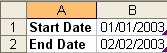
Open a workbook and on the active sheet in cells A1 enter Start Date and in B1 enter the date 01/01/2003. In A2 enter End Date and in B2 enter the date 02/02/2003.
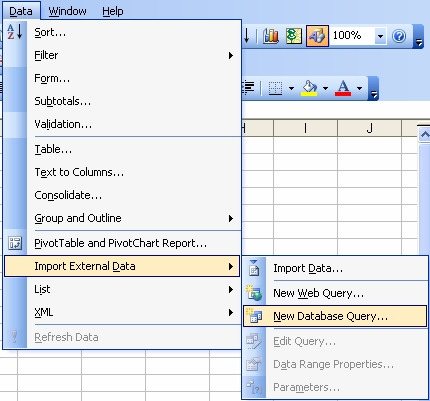
Take the menu options Data>Import External Data>New Database Query…
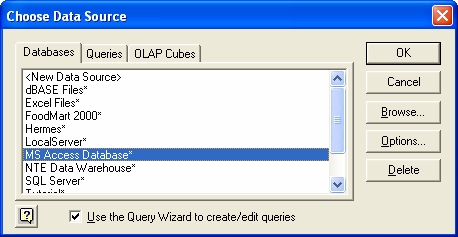
You will fire from here a dialog asking for your selection of an external datasource. We have chosen ‘MS Access Database’.
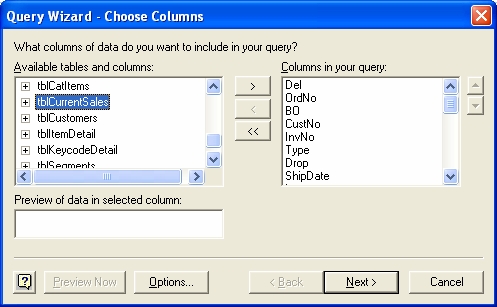
Navigate your way to your Access database and select the table or query you want from the list displayed and add the fields you require, as below. (Remember, if you have a parameter query in Access already, this will create an error if we try to use it in Excel. ‘Too few parameters, expected 1’) .
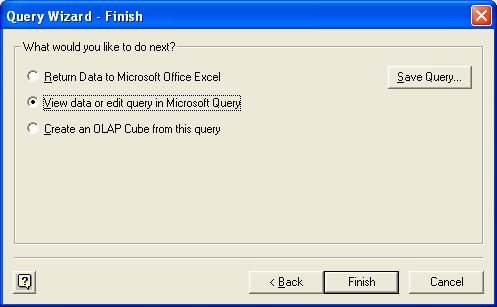
Move on three screens making no changes until you arrive at the final screen (below). Take the second option to ‘View data or edit query in Microsoft Query’. This will launch Microsoft Query. (For those familiar with Access, this looks very similar to the query designer).
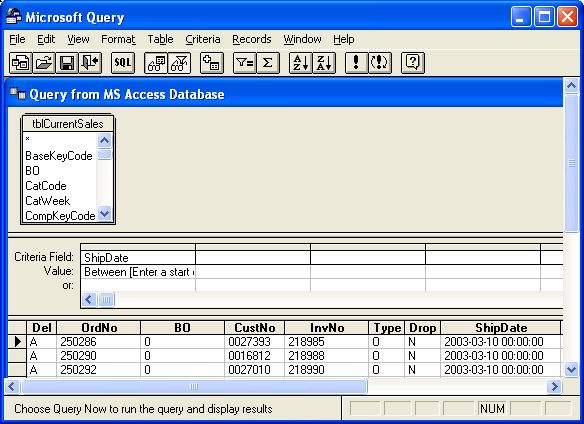
From the image below you can see we have shown the ‘criteria grid’ by selecting View>Criteria from the MS Query menus.
In our example we are going to take orders with a ship date between two dates, (01/01/2003 and 02/02/2003). To do this we enter the operator ‘Between’ followed by our first parameter. These are enclosed in square brackets and what is in here will, in certain circumstances, appear as the prompt in the input box, with the entry being the parameter. ‘Between [Enter the start date]’.
The next part is the ‘And’ operator followed by our second parameter, completing the parameter thus:
Between [Enter a start date] And [Enter an end date]
In MS Query select File>Return data to Microsoft Excel. You will be prompted for your two parameters. (start and end date), but you can ignore them. (Answer OK).
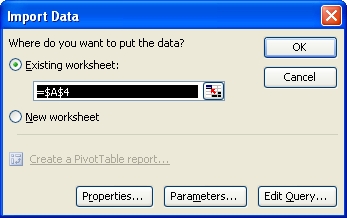
You will now get the dialog below, asking for the positioning on the sheet.
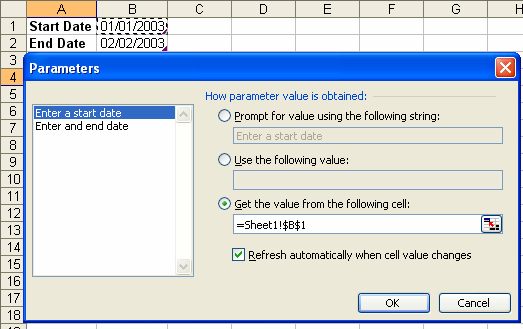
Click the ‘parameters…’ button to show the dialog below. You now have three choices.
- Prompt for the values. (You can enter any prompt here).
- Use the following value. (You can enter a static value).
- Get the value from the following cell (Our example).
Remember to set how the value is obtained for all values and, if you want the data to update each time you change the value of the cell(s), then select the checkbox. (against each value again).
Click OK in the ‘Parameters’ dialog and select $A$4 as the cell for the start of the data, click ‘OK’ in the ‘import data’ dialog and your data should flow in filtered between the two dates supplied. Each time you change the dates, the query is refreshed with the new input.
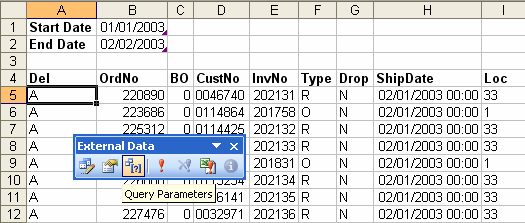
If you find you wish to change parameters or the way they action at a later date, this can be done in Excel via ‘Data>Import External Data>Parameters…’ or via the ‘External data’ toolbar. (Above).
Hope you can use this and any comments welcome
Nick Hodge
MVP – Excel
Nick
Will this work with all data sources i.e. SQL Server ? I’ll try it out, I’ve been looking for a way to reference such a criteria within the excel workbook.
Jake
Jake
Sorry needed sleep…yes it will work with any datasource registered as an ODBC source. SQL Server should be fine. (If you look carefully in the list in the dialog near the top, SQl Server is listed in my ODBC sources.
Nick
Hi.
As it happens, I’ve been looking in depth at QueryTables.
One thing I’ve been trying to do is work with OLE DB querytables with parameters.
I’ve not been able to get the two working together.
ODBC querytypes work OK with parameters, but it seems OLE DB querytypes do not.
Could you tell me whether you’ve had success?
Cheers
Rob
Hi Nick,
Good article!
Dick Kusleika and I have been working on a so called Querymanager some time ago, but it sort of died slowly due to lack of time on both sides.
One of the things it can do is add parameters to a query, but not linked to a cell.
There is a beta still around:
http://www.jkp-ads.com/QueryManager.zip
Could you send me a workbook that works as per your example? I’d like to see the sql and commandtext for the query.
Bit off topic:
I have a project at the mo, where the usere has about 40-50 workbooks and needs to pull data from them into one workbook.
I’m thinking that i’m going to stick all the files in to one folder and use MS query to import the data. i.e query each “table”.
I’ll ask if the data can be got in a difffrent way first mind!
I’ll take a look at that addin, might it help in this case?
what joys!
I doubt the addin will do you much good.
When I use the New Database Query with the Parameter query. I get a pop up saying “TOO FEW PARAMETERS”. Let me know how to solve this problem.
Antony
If you are comfortable with SQL and QueryTables, then you might be interested in my Query Editor Add-In.
It allows better control over Parameters on ODBC QueryTables than the standard Excel interface provides.
It’s freely available on my website: http://www.vangelder.co.nz/excel
Hi Rob,
Have you seen what Dick and I started smashing together? It is called Query Manager (Beta) and may be found here:
http://www.jkp-ads.com/QueryManager.zip
Both Dick and I lacked the time to continue working on it alas.
Anthony, See:
http://support.microsoft.com/default.aspx?scid=kb;en-us;171850
Jamie.
Hi Jan Karel,
I downloaded it a few weeks ago – just as I was finishing off my Add-In.
As I recall, your add-in did some pretty funky stuff with SQL – like a where clause builder for adding parameters.
SQL parsing is not easy – that’s impressive.
There is some overlap between our add-ins…
My direction has been to leave SQL up to a SQL builder tool and concentrate on managing the querytables and parameters.
PS. How do you like to be addressed? Jan or Jan Karel?
Cheers,
Rob
Hi Rob,
Jan Karel it is.
Dick deserves all credits for the parsing stuff, I just did the first basics of the thing, like userform and getting the querytables into it and stuff like that. Then (since I don’t use QT that extensively) I asked around for some testers and Dick jumped in and lifted the thing from ground level to what it is now.
Pity we haven’t had time to do more with it.
Love your presentation. I am very much a do it by pictures man. But having a few problems.
I got to the part where you go “File>Return data to Microsoft Excel”. The small form that I get up is different than yours. Both the “Properties” and Parameters” buttons are directly below the “OK” and “Cancel” buttons and the Properties Button is inactive. I can’t see where to activate it.
I have tried to put a cell reference in the Criteria Field, Value and I am getting Syntax errors.
=Sheet2!$A$3 or Sheet2!$A$3 does not work for me.
Is there any other way of getting to the “Parameters” menu to help me
I am using Excel 2000
Thanks
Eric
I wonder if it would be possible to go one step further. That could make my life a lot easier!
My database resides on SQLserver.
In Excel, I am using many pivot tables based on a certain view A.
This view is itself based on a certain number of others views needed for a complex data processing.
At the root of this 4-level cascade of views there is essentially one big table X.
Being able to restrict the data used from this table X, based on a parameter would be very useful for my application, seen from within Excel.
This parameter would influence the results of all intermediate queries between A and X.
As you can see, there is no way to use the Query add-in tool to solve my problem. Would there be a way to really pass a parameter to the database ?
Are all of these queries returning results to Excel worksheets?
Here is a bit of commented code I use to extract data from an access database, with excel providing the desired parameters. This does NOT use the Excel Get external data route. Have fun!
This was an early attempt, and lots of improvements are possible
Sub Load_Cus_Data()
Dim i As Integer, x As Integer, yearmo As Integer
Dim dtMonth As Integer
Dim dtYear As Integer
‘ Dim dtDivision As String
Dim MyColumn As Integer
Dim MyDB As Database
Dim MyQueryDef As QueryDef
Dim rsRecSet As Recordset
‘ Dim strYear As String
Dim strDivision As String
‘ Dim strRec As String
Dim dtBUnit As Integer
Dim xKWH, xCUS, xREV As Integer
Dim OpFlag As String
‘Get Month and Year data from worksheet MACRO tab
dtMonth = Sheets(“Macros”).Range(“d5?)
dtYear = Sheets(“Macros”).Range(“d6?)
‘ calculate row offset for selected year and month
yearmo = (dtYear – 1993) * 12 + 13 + dtMonth
‘ strYear = CStr(dtYear)
‘ Prevent recalculation every time a new data point is added, until all the data is loaded
Application.Calculation = xlCalculationManual
Application.ScreenUpdating = False
‘Open the database
‘ Set MyDB = OpenDatabase(“NYSKGOSHARED01KIRKWOODFCSTFORECASTLargeCustLargeCust.mdb”)
Set MyDB = OpenDatabase(“F:FCSTFORECASTLargeCustLargeCustInfo.mdb”)
‘Assign MyDB to QryLrgCust
For i = 0 To MyDB.querydefs.Count – 1
If MyDB.querydefs(i).Name = “QryLrgCust3? Then
Exit For
End If
Next
Set MyQueryDef = MyDB.querydefs(i)
MyQueryDef.Parameters(0).Value = dtYear
MyQueryDef.Parameters(1).Value = dtMonth
Set rsRecSet = MyQueryDef.OpenRecordset
While Not rsRecSet.EOF
‘select WORKSHEET based on cost area name in database record(2)
strDivision = rsRecSet(2)
OpFlag = Right(rsRecSet(8), 3)
If OpFlag = “O ?” Then
OpFlag = “BRQ”
End If
Worksheets(strDivision).Activate
‘ Let the user know where you are
Application.StatusBar = strDivision
For MyColumn = 4 To 81
‘When cell matches for RevCl, Perm_Ref and RateCode, enter MWh data
If rsRecSet(3) = ActiveSheet.Cells(6, MyColumn) And _
rsRecSet(4) = ActiveSheet.Cells(3, MyColumn) And _
rsRecSet(5) = ActiveSheet.Cells(7, MyColumn) Then
If ActiveSheet.Cells(yearmo, MyColumn).Formula = “=NA()” Then
ActiveSheet.Cells(yearmo, MyColumn).Formula = “=” & _
(rsRecSet(6) / 1000) & “*” & OpFlag
Else
If rsRecSet(6) > 0 Then
ActiveSheet.Cells(yearmo, MyColumn).Formula = _
ActiveSheet.Cells(yearmo, MyColumn).Formula & “+” & _
(rsRecSet(6) / 1000) & “*” & OpFlag
End If
If rsRecSet(6) < 0 Then
ActiveSheet.Cells(yearmo, MyColumn).Formula = _
ActiveSheet.Cells(yearmo, MyColumn).Formula & _
(rsRecSet(6) / 1000) & “*” & OpFlag
End If
End If
Exit For
End If
Next
rsRecSet.MoveNext
Wend
Worksheets(“Macros”).Activate
Application.ScreenUpdating = True
Application.Calculation = xlCalculationAutomatic
Application.StatusBar = False
Application.Calculate
End Sub
Not using Get external data? Here’s mine:
Sub Just_Four_Lines()
Dim rs As Object
Set rs = CreateObject(“ADODB.Recordset”)
rs.Open _
“EXEC MyStoredProc ” & _
Format$(Sheet1.Range(“A1?).Value, “‘yyyy-mm-dd'”) & _
“,” & _
Format$(Sheet1.Range(“A2?).Value, “‘yyyy-mm-dd'”) & _
“;”, _
“Provider=Microsoft.Jet.OLEDB.4.0;” & _
“Data Source=C:MyJetDB.mdb”
Sheet2.Range(“A1?).CopyFromRecordset rs
End Sub
Jamie.
Jamie,
Just a note about your approach.
Supplying parameters as SQL text leaves you open to SQL injection attacks.
As a rule, I’ll always execute Command object with Parameters.
Consider the following:
rs.Open “select count(*) from usertable where username = ‘” & strUsername & “‘ and password = ‘” & strPassword & “‘”
username: jamie
password: whateveryouwant’ or ‘abc’ = ‘abc
More details here…
SQL Injection Walkthrough
I love the parameters setting in Excel and have been using it for ages with our Ingres database.
Suddenly, when using a date parameter with the Ingres ODBC, the data extracts until I then attempt to return the data to excel and the whole thing crashes every time. If I use the date directly in the criteria it works fine.
If anyone out there can come up with any clues to why this has suddenly gone wrong, it would be very appreciated.
On my website is an add-in called Query Editor.
It allows finer control over Querytable parameters than that which Excel’s UI provides.
Your crash may have something to do with the configured data type, typically “unknown”.
Cheers,
Rob
Rob Van Gelder’s utility has fixed my problem )although int’s not thoroughly tested yet!)and I’m on 2002. Thanks a lot Rob, problem solved in the short term. I just have to try and pin down why it stopped working in the first place. I have a sneaking suspicion that a microsoft automatic upgrade has managed to get in the way.
Have only just found this web site and have benefited greatly already.
thanks for taking the time to write this tutorial Nick, its exactly the information that I was needing, I was close to pulling my hair out trying to find the correct solution to my problem.
cheers,
Mike H
Good piece of info and just what I needed. Thanks for your effort.
Sai.
Hello,
I was wondering how the following query can be used in Excel using parameters:
Select * from SampleTable
Where SampleColumn in (‘A’,’B’,’C’)
I want to use a range of cells or multiple values in a cell (separated by ,) as a parameter to the where clause. Is this possible?
I guess you should be using three cells and three parameters for this construct.
Eric, i’m experimenting the same problem you had. Did you find any solution?
JP
RvG: “Supplying parameters as SQL text leaves you open to SQL injection attacks”
I’ve only just seen this
My parameters are typed as DATETIME e.g. something like this:
CREATE PROCEDURE MyStoredProc @start_date DATETIME, @end_date DATETIME = NULL AS SELECT pilot_ID, earnings_amt, start_date, end_date FROM Earnings WHERE start_date >= @start_date AND COALESCE(end_date, -2)
Any ideas on how to constrain the resulting range of the querytable?
For example, extracting a single field from a single record results in a query table with a range that is 3×1 cells if I don’t format it to have a field name and 2×1 cells if it does have a field name.
Ideally, I’d like a 1×1 range for such a database query.
“Ideally” because I’m trying to set up the worksheet without hidden rows because I’m creating a ‘list’ where the header is derived from one field and the data from another set of fields – having blank rows in the list is causing some headaches.
thanks,
Christopher
RvG: “Supplying parameters as SQL text leaves you open to SQL injection attacks” (continued)
… I don’t see how a parameter value is vulerable to an injection attack, regardless of data type. The parameter value will be interpreted as a value rather than being converted to SQL code. Am I missing the point?
Jamie,
I wasn’t very clear. Sorry.
Supplying parameters the proper way (by using parameter objects) helps to defend yourself against sql injection attacks.
It’s generally a problem for websites, not Excel, but since the topic moved to sql in general, I thought id mention it.
Consider the following code for checking a password:
Function validatepassword(username As String, password As String) As Boolean
Dim i As Long
i = getsqlresult(“select count(*) from myusers where username = ‘” & username & “‘ and password = ‘” & password & “‘”)
validatepassword = not i = 0
End Function
at the prompt:
username?: rob
password?: nothing’ or ‘x’ = ‘x
interpretted sql is:
select count(*) from myusers where username = ‘rob’ and password = ‘nothing’ or ‘x’ = ‘x’
= nasty back door
“i’m feeling lucky” from google: sql injection attack explained
and for fun:
SQL Injection Walkthrough
Rob
Hi all,
Question for Rob van Gelder and Natalie Cooper (or anyone who has an answer!!!). I’ve experienced the same problem as Natalie with date/timestamp parameters, Ingres and ODBC. Exactly same symptoms as Natalie. Query runs fine in MSQUERY but crashes on return to EXCEL if parameters have been configured. The crash only appears to happen where date parameters are involved …. no problem with text fields … haven’t checked others.
I originally thought this must be a problem with the Ingres ODBC driver …. but if it works OK with Rob’s query editor I assume the driver is OK? So that leaves a problem between MSQUERY and EXCEL …. but if so, I’d expect it to be generic in nature so there would be a lot more users experiencing this problem????
Does anyone know the cause of this problem?
In the meantime, looks like I’ll be making a lot of use of Rob’s editor!!! Thanks Rob!
PS.
Using Rob’s editor I can reproduce the MSQUERY problem by setting parameter type to ‘timestamp’. Setting it to ‘date’ works fine. Also, I’m using EXCEL 2000, and editor seems to work fine.
I’ve used parameters in MS Query for some time.
The problem I have is that I often need to summarise data before exporting it.
When I sum data, it changes the ‘Where’ clause to ‘Group By’ and ‘Having’ at which point the parameters stop working. The prompt in the parameter string is flagged up as an invalid column name.
Can I get around it?
Just happen to drop by this page by chance~
Am working on MSQuery too on Excel 2002. I have a problem using MSQuery and wondering if anyone can help cos i did alot of search but seems to land me no where.
I have an Effective_Date column in MSQuery. Suppose I need to base on an input date i entered, then compute the day difference between each data in that column , and returned me date that gives me the min number of days. How can i do this?
I tried in Criteria field and enter ‘Effective_Date’-today()
and in value : MIN
….
Hi,
I am trying to import data into Excel using the AR System ODBC data source provided by Remedy
Have used a Paremeter Query . The Query runs fine in MS Query, But when I say Return data to Excel ,it Gives an error ” driver]parameter missing”
I downloaded Rob’s Query Editor add-in and tried with that. The same problem occurs.
Any help to solve this would be very much appreciated.
Thanks,
John C
john.chandra@weyerhaeuser.com
I am using ms query for basic things like searching for ship history given a date range. I know that I can have it prompt me for dates but I can’t figure out how to have it prompt me for part of a PART NUMBER. How can I have excel/ms query prompt me to search all items that contains part of a PART NUMBER. I have tried: LIKE ‘%[Enter something to search for]%’ but I does’t work.
Thanks for any help,
Roger
Roger,
I use the Query Editor add-in, available on my web-site.
I have not tried to see if this will work with Microsoft Query.
Add a parameter to the query.
For an Oracle database the SQL becomes:
select * from mytable where mycolumn like ‘%’ || ? || ‘%’
I’m not sure about other database.
I’d guess that the OR operator || becomes &
Usually I would let the user type the wildcard for themselves.
so the SQL would be simply:
select * from mytable where mycolumn like ?
Rob
Thanks for the reply. I have saved your addin for future use if I move on to more heavy duty querying. Currently I am looking at large but simple DBF files. I figured out how to get MS Query to prompt for a search string:
Like ‘%’ & [Enter the complete part number or a portion of a part number to search for] & ‘%’
Again, thanks for the help.
Roger
Hi Nick, that was an excellent tip, thanks much for this tip.
Hi Nick,
This was a great tip. Very cool & works nice!
For some reason though, sometimes is does not want to refresh. Haven’t been able to pin down why it does this but I included a date column so the user can tell if it doesn’t refresh correctly. Once I go threw the motions of resetting the parameters and maybe closing and reopening the spreadsheet, it works.
Thanks for sharing your info – it was a huge help to me.
Tammi
Hi everybody,
I am trying to import data into Excel using the AR System ODBC data source provided by Remedy
Have used a Paremeter Query . The Query runs fine in MS Query, But when I say Return data to Excel ,it Gives an error ” driver]parameter missing”
Jonh C has the same problem, I’ve locked in every where and everybody and no one knows why is this happenig.
I will apreciate if anyones can help me.
I got to the part where you go “File>Return data to Microsoft Excel”. The small form that I get up is different than yours. Both the “Properties” and Parameters” buttons are directly below the “OK” and “Cancel” buttons and the Properties Button is inactive. I can’t see where to activate it.
What version of Excel are you using? Can you access the properties from the External Data Toolbar after the information is in Excel?
hi, i tried your tutorial and followed all your instructions. i am using Sybase and when i try to add the criteria “Between [Enter a start date] And [Enter an end date]” it keeps on giving me an error “Expected lexical element not found: )” would you know why is this happening? thanks alot!
This is a long-shot, but has anyone found a solution for the issue reported by GIlberto above? Please email me if you have (randalldotharveyatedsdotcom)
GIlberto:
Hi everybody,
I am trying to import data into Excel using the AR System ODBC data source provided by Remedy
Have used a Paremeter Query . The Query runs fine in MS Query, But when I say Return data to Excel ,it Gives an error ” driver]parameter missing”
Jonh C has the same problem, I’ve locked in every where and everybody and no one knows why is this happenig.
I will apreciate if anyones can help me.
19 October 2006, 9:11 am
Thanks for all the info on this page.
I’m trying to use a cell in excel to change the criteria of the microsoft query pull. When I change the value of the cell I get the following error “[Sybase][ODBC Driver][Adaptive Server Anywhere]Restricted data type attribute violation: Cannot convert 39204 to a timestamp” The date seems to be enter in the right format and the field that contains the criteria is a date field. Anybody have any ideas.
Thanks
Rob
Rob,
Try formatting the date using a =TEXT() function and have the query parameter use that cell. I usually use dd-mmm-yyyy format or yyyy-mm-dd might work as well depending on the target database.
I work with external data alot but found MS Query to be too tedious a process particularly when changes take place. So, I wrote the code below that allows me to write or paste script into a column then after selecting the script I run it from a custom menu selection. One added benefit is I do not need the ability to write complex nested or correlated queries to get some of the results I normally want to my spreadsheet; I just write the necessary individual queries then select and run them as needed.
‘ Procedure : ReadData
‘ DateTime : 10/18/2007
‘ Author : Donald R. Cossitt
‘ :
‘ Purpose : procedure clears any existing data from the dataset area in the
‘ : sheet. reads script from column A beginning at row 4. passes that
‘ : string value to a boolean function IsOpen( String ) that will
‘ : create a table query based on connection properties read from
‘ : named ranges : dsn_name; database_name; user_name; password
‘ : if all goes well the function will return TRUE if not FALSE and
‘ : simple error message displayed
‘ Last Update :
‘ Issues :
‘ :
‘ ———————————————————————————–
‘
Public Sub ReadData()
Dim vItem As Variant
Dim szSql As String
‘Application.ScreenUpdating = False ‘ no twitching please
‘ClearDataset
‘ActiveSheet.Range(“$A$4”).Select ‘ list start
‘Range(Selection, Selection.End(xlDown)).Select ‘ select the list
‘ read each row item in the selected list
For Each vItem In Selection
szSql = szSql & Trim(vItem) & “” & Chr(13) & “” & Chr(10)
Next vItem
If IsOpen(szSql) = False Then
GoTo EH
End If
TheExit:
Application.ScreenUpdating = True
Exit Sub
EH:
MsgBox “Failed Data Open”, vbCritical, “DATA BAD”
GoTo TheExit
End Sub
‘ ———————————————————————————–
‘ Procedure : IsOpen
‘ DateTime : 10/13/2007
‘ Author : Donald R. Cossitt
‘ :
‘ Purpose : function receives a string sql read from the A column of READER
‘ : sheet. if system has a valid DSN, Database, User, Password
‘ : a QueryTable is added to the QueryTables collection and populate
‘ : the dataset area of the READER sheet.
‘ Last Update :
‘ Issues :
‘ :
‘ ———————————————————————————–
‘
Public Function IsOpen(ByVal szSql As String) As Boolean
Dim fOpen As Boolean
Dim fColumnNames As Boolean
Dim szDSN As String
Dim szUser As String
Dim szPass As String
Dim szCatalog As String
Dim szResultCell As String
On Error GoTo EH
‘ read connection parameters from READER sheet range names
fOpen = True ‘ assume the best
szDSN = Range(“dsn_name”).Text ‘ dsn name
szUser = Range(“user_name”).Text ‘ user name
szPass = Range(“password”).Text ‘ password
szCatalog = Range(“database_name”) ‘ database name
fcolumnname = Range(“use_headers”) ‘ yes / no
szResultCell = Range(“result_cell”) ‘ upper left of result set
m_szDataStart = Range(“result_cell”).Text
With ActiveSheet.QueryTables.Add(Connection:= _
“ODBC;DSN=” & szDSN & “;” & “UID=” & szUser & “;” & _
“PWD=” & szPass & “;DATABASE=” & szCatalog, Destination:=Range(szResultCell))
.CommandText = szSql
.Name = “QRY_” & Format(Now(), “mmddyy_hhmm”) ‘ create query name
.FieldNames = fColumnNames
.RowNumbers = False
.FillAdjacentFormulas = True
.PreserveFormatting = True
.RefreshOnFileOpen = False
.BackgroundQuery = True
.RefreshStyle = xlOverwriteCells
.SavePassword = True
.SaveData = True
.AdjustColumnWidth = False
.RefreshPeriod = 0
.PreserveColumnInfo = True
.Refresh BackgroundQuery:=False
End With
TheExit:
On Error GoTo 0
IsOpen = fOpen
Exit Function
EH:
fOpen = False
GoTo TheExit
End Function
I don’t claim to be an elegant author, as the two routines above my display – but it works…
I am trying to use one query but with multiple paremeters depending on the cell. For example I have a list of dates in Column A and I want to run the query for each dates shown in column B, so the paramter for B1 is A1, B2 is A2 etc.. How do I do this in Excel?
Thanks Laura
I’m trying to add information from a table based on results from a filter using three separate fields. However I only want to place the results from one of the fields in the excel cell. HELP
So did anyone find a solution to Gilberto, Randal and John C’s issue? I’m encountering the same problem. I’d like to create a query from Remedy with parameters and I get the Parameter Missing error.
I’m using Excel 2003 and the AR System ODBC driver. I can follow Nick’s instructions against a Sybase database, but not AR System. When creating the query against AR System I’m forced to enter criteria instead of moving on to the final query wizard screen without making changes. Once I make changes and then I modify the contents of the criteria grid, it works within MS Query and Excel generates the error.
If someone could post a link to a reference, or send me an email that would be great..! Thanks in advance.
mfspam74 @ earthlink.net
I read Dick Kusleika post on how to view an embeded data source by bringing up VBE. How do you change the data source/connection string ?
Jos: See
Designing an Analysis Template
http://www.tushar-mehta.com/publish_train/data_analysis/22.htm
particularly the section ‘Connecting the template to a new data source’
You may have to adapt the code for your specific requirement…
I know the question is old, but I think I have the answer and it may help someone else. To answer Carl’s question above regarding the use of summarized fields (or count, etc.) you can do this if you first build your query without the summarized fields but be sure to include the fields you want parameterized. Then the application will allow you to set up parameters just as the instructions above indicate, and if you later modify the query to include the summarized fields, the parameters will be retained! A tricky workaround indeed!
Dennis
Very very clever
Sam
Excellent post, very clear.
Thank you very much!
vince
[…] Laura asks: I am trying to use one query but with multiple paremeters depending on the cell. For example I have a list of dates in Column A and I want to run the query for each dates shown in column B, so the paramter for B1 is A1, B2 is A2 etc.. How do I do this in Excel? […]
As so often happens, I was googling to learn something new and ended up back at one of my favorite sites. Thanks Nick and Dick (!) for a clear, concise post.
Excellent, very clear.
Thank you very much!
Great! It solves my problem in seconds…..
In fact I spent 2 days on MS help which is completely useless…..
Thank you very much and actually I need to bookmark here.
Hello….very helpful info, but I’m running into some trouble with an additional step with the parameter query. I have excel 2007 and I’m trying to add a ‘Like’ wild card into the parameters but it won’t accept the format with the query. When I type in the specific info with the wild card it works fine, but leaving it as a broad parameter it gets stuck. Does anyone know why?
Very very helpful …
Thank you …
Query Manager is now at http://www.jkp-ads.com/downloadscript.asp?filename=QueryManager.zip
Thanks Nick! You are a genius!
hi all. Does anyone know how MS query to dynamically return a select range of columns? I’m using MS query to grab some data off a spreadsheet. I want to restrict the data to return a range of dates, but unfortunately in this spreadsheet the data is arranged by date columns, and I can’t restructure the spreadsheet into a database structure. When new data gets pasted into the spreadsheet, someone adds a new date at the top right of the existing data array and then pastes the correstponding data below. So it’s structured like this:
Category 1/6/2009 1/9/2009 1/12/2009
Planes 112 123 52
Trains 52 53 123
That is, it doesn’t have a ‘date’ column header but rather the columns across the top of the spreadsheet are quarters.
If I want to select the categories for a couple of these date columns, then I can use something like:
SELECT Category, ‘39965’, ‘40057’, ‘40148’ note that these numbers are dates
FROM ‘Worksheet_Name$’
…but what I’d like to be able to do is dynamically select just the most recent column that I want, and I don’t want to have to manually update my MS query SQL to pull the latest x columns. (Say the last two for the above example.)
How do I code in a check on column headers so that it only pulls the ones with the largest dates?
Thanks in advance if you can help. Sorry to disturb you if you can’t. :-)
Jeff
Jeff: I don’t think you can do it without changing the query every time. I would put it on a separate sheet and use
That way you’ll get every column. Then you could use a formula to get the data from the column you want.
Hi Dick. That’s what I’m doing at the moment, which is working well enough…I just wanted to see if I could do this for the sake of it. Fazza over at the MR Excel board gave me some options, all requiring VBA code:
1) Run one query – say just a small dataset returned – such as “SELECT TOP 1 * FROM data” to a worksheet, maybe (very) hidden. Then based on the last few returned headers, edit the SQL in the query you’re really interested in.
2) Or instead of a query table, use either ADOX to read the header names, or, and it might be simpler, plain old ADO to query the data – and again returning a small dataset if there is a lot of data – and loop through the fields collection, grab the last few headers and edit the SQL to suit.
(I was naughty and cross-posted)
So I’ll probably call the SQL from VBA…just need to work out how when I get time to consult GOOGLE.
Slight aside…when I refresh my query, and if someone else at work has the source file open, then for some strange reason the source file gets opened by my pc and then all the data gets populated into my destination book with screwed up formatting. But if the source file is closed, it works fine. MS query is pretty darn mysterious…
http://www.dailydoseofexcel.com/archives/2010/04/28/dynamic-columns-in-ms-query/
http://www.dailydoseofexcel.com/archives/2010/04/28/dynamic-columns-in-ms-query-ii/
I’m working with dqy files and it’s nice for end users cause they can just double click the file and open it. I have two questions:
1) When first opening the query, there is a dialog box that pops up:
“Opening Query
This file contains queries to external data.
Queries are used to import external data into Excel, but queries can be designed to access confidential information and possibly make that information available for other users, or to perform other harmful actions.
If you trust the source of this file, click Open.”
With Open and Cancel buttons. Any way to suppress this message and skip it?
2) If I wanted to open a dqy file from a command prompt, can I send a parameter to it?
Thanks!!!
Cort
Hi
Brilliant! I have tried this before and could not get it working.
Thanks a mil.
Rene
Hi,
Congratulations for this post.
I have one dynamic table and I am seeking SQL Server data with criteria of date.
…
WHERE (tblPrdTotaliz.TagTime>=? And tblPrdTotaliz.TagTime<=?)
…
I followed step by Step and worked. If I not close the file works, but when I saved the file and open again, asks for me enter the date again or the cell with the date.
Have you seen this happen?
Thanks
I am using Excel 2007 doing a connection to Access. Why is my Edit Query box inactive?
My problem has all to do with Ms SQL Server and Excel and parameters but I’m adding a problem. I don’t want the users to have access to my tables at all. To be totally sure my db is protected I want to access my database through a stored procedure and show the result in Excel – AND I want the user to be able to put in a value as a parameter to my procedure. I have tried to access the procedure through ODBC, but then it will not accept a parameter.
Any ideas – anyone?
Very grateful for all answers that can help me here
I need help.. when a week falls in two months I need a formula to figure out how many hours was in one month and how many hours was in the other month..
Example: Beginning week: 11/27/11 Ending week 12/3/11 Employee worked 0 hours on 11/27, 8 hours on 11/28, 9 hours on 11/29 9 on 11/30, 9 on 12/1, 8 on 12/2 and 4 on 12/3 now I need to know how many Reg hours and ot hours they had in the 1st month (Nov) and how many reg hours and OT hours in the 2nd month (Dec) or what ever month it happens to be can some help me with fixing a spread sheet for this? I have to split this up for billing purposes…
Thanks for any help you can give me..
Kim
Torunn, why not create a view? This keeps your users off your tables, but brings all of the Excel parameter discussion here back into play.
Thanks for the post. This is exactly what I needed to limit a SQL date range extract from my SQL Server data into my Excel 2010. I had to create a separate tab to hold the parameters; otherwise, the parameters are destroyed by the returning data from the Query. The parameters button is also at a different location in Excel 2010; but once you find/allocate it from the Properties, then it works as a charm. :)
YOU ARE THE BEST!!!!
Hi,
I used a date range start and end in two cells in excel to extract the data through MS query. The file works fine the first time but when I close it and open it and try to refresh excel stops working and then I receive a message stating excel found unreadable content in your file. FYI, Im am using excel 2010.
Absolutely brilliant! Works a dream.
Would it be okay if I refer to this in my blog?
Happy to link back to your post.
i am using this method but i want to know is their any possiblity that can user update server databse via using excel sheet?
if yes then please reply that how to secure database from updations by user
Dear Madam,
Can you pls help me with ALL the type of criteria we can use under excel data query:
Example: we use
like[]
like[] + %
Between [Enter a start date] And [Enter an end date]
Substring(
Pls help me with the full list and description if possible, Thanks
Warm regards,
Sajjad
Hello!
Very good article.
I used this with Excel connecting in a SQL Server.
It solved my problem and many others…
Thank you very much!
Hi Nick Hodge ,
I am trying to set up a parameter query using ODBC-Microsoft Query to BMC Remedy The ODBC connection used in Excel-get external data is “AR System ODBC Data Source”.
I want to pass a parameter to modified date field and get all the remedy tickets for which the modified date is={ts ‘2014-10-01 00:00:00’}) AND (“table name”.”Modified-date”<=?)
I am getting the data fetched from database in the MS query window, but unfortunately
When I click File-Return Data to Microsoft Excel, its showing an error: Driver]Parameter missing
I set the connection properties- parameter-Prompt for value using the following string.
Please help
John Chandra, GIlberto, Randall Harvey & Leonel were having same issue..I didn't find any reply to it.
If anyone of you guys got the solution please share it here
Thanks,
Nivea
Format the cell as text.
Had the same issue; formatted the cell as text and just typed in a date as 2014-07-11 for 11Nov2014
Thanks for this helpful hint!
Hello there,
I’m trying to add multiple values to a single parameter with no luck. MS Query as limit to how many i can insert manually. When connecting to MS DBase, i use “,” but in SQL Query it doesn’t work.
The whole problem is MicroSoft. MS subverted the parameter process when pointed to an excel location. ( Check out natalie’s comment from 2005: natalie cooper says: February 25, 2005 at 12:36 pm). Basically, the parameter is visible and saves. You can refresh with no issues. Once you close the spreadsheet the parameter location is gone. Funny thing is, if you specify a value, or fill out the prompt with a words, those are saved!!!!!
If you ask microsoft about this, they will give you all kinds or run around responses.
So, what we need is a work around that can ‘fill’ the Parameter “Get the value from the following cell” on open of the spreadsheet. If this code is created, all our parameters problems with Pivot Tables goes away.
Here is some more information. MS Excel spreadsheets are now saved in an XML format. If you change the extention from .xlsx to .zip, you can view the components of the spreadsheet. The most important file for Pivot Table Parameters is connections.xml in the xl folder. If you open connections.xml, you can plainly see your parameter stored with something like:
The problem is MS EXCEL is ignoring the parameter cell data when opening the spreadsheet. So, we need a VB Script or something that can read connections.xml upon opening of the spreadsheet and populate the cell data appropriately…
Here the code in cnnections.xml:
Passing Multiple Values in a single Parameter to an Excel Table:
I have struggled with this a lot. Finallly I realized that its the EXCEL passes the Arguments.
For Example:
I had a SQL Statement that works when I use:
select * from employees where employee_id in (1,2,3,4,5)
But whenyou change that to
select * from employees where employee_id in (?)
and pass 1,2,3,4,5 in an argument, Excel sends “1,2,3,4,5”
That will cause an error as it is not a number and passed as a string.
The way you can work around this is to change the SQL and the Parameter value in the following way:
1. change the Parameter to “,1,2,3,4,5” ( I used Comma, you can use any character , e.g. “|”.
2. change the SQL to: select * from employee where INSTR(?,CONCAT(‘,’,CONCAT(employee_id,’,’))) > 0
Sure, this is not optimas optimized as you would like, but it works.
Hope that helps.
Thank you! I have known that this had to be a simple fix, but continually ran into road blocks learning what that fix would be. You have opened a whole new world for me regarding queries!!!
Hi. I am looking to have a criteria with a prompt [parameter]
If I enter [Enter Type] for example I get the type, and thats great, but what if I want all the data? If I leave the prompt blank it returns nothing. I have read a million blogs on how to do this on ACCESS but the format doesn’t jive with MS Query.
To summarize I would like to leave the prompt blank and have it return all the data. I would like this in the criteria format NOT SQL.
Thank you.
The difference between Access and MySQL is the wildcards. MySQL uses percent (%) for any character and underscore (_) for one single character, while Access uses * and ?, respectively.
I don’t think there’s anything you can do to the parameter to make it work this way. You have to write the query as
WHERE Type Like "%"+[Enter Type]+"%"so that if you leave Enter Type blank, it returns everything. But there are pitfalls to this, not the least of which is that
Likeis a resource hog.