Testing For Empty Cells

To test for empty cells, use the IsEmpty function. IsEmpty takes one argument, a variable, and returns True if that variable contains nothing (Technically, I think it returns True if the variable is uninitialized). While it's true that you can pass variables to IsEmpty, you can also pass object's properties, specifically the Value property of the Range object.

Many times you will see programmers test for a zero length string, like this

If Range("A10").Value = "" Then

In 99% of the cases, that will work. However, if the cell contains a single quote and nothing else, then it will contain a zero length string, but will not really be empty. To test for true emptiness, use IsEmpty on the Value property.

Sub TestForEmpty()
 
    Dim sPrompt As String
    Dim rRng As Range
   
    Set rRng = Sheet1.Range("A10")
    sPrompt = "Range contains "
   
    rRng.ClearContents
   
    MsgBox sPrompt & "nothing = " & IsEmpty(rRng.Value) & vbNewLine & _
       sPrompt & "a zero length string = " & CBool(rRng.Value = "")
       
    rRng.Value = "'" 'single quote
   
    MsgBox sPrompt & "nothing = " & IsEmpty(rRng.Value) & vbNewLine & _
        sPrompt & "a zero length string = " & CBool(rRng.Value = "")
       
End Sub

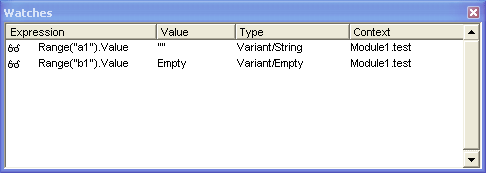
Update: A newsgroup post by Otto Moehrbach prompted me to look a little deeper into how IsEmpty works. I wanted to determine why a cell with a formula that returns an empty string behaves differently than an empty cell. I set up a watch for A1 and B1 to see what was going on. A1 contains the formula ="" and B1 contains nothing at all.

watch window showing status of A1 and B1

A1 is a Variant/String and B1 is a Variant/Empty which obviously accounts for the difference. There's nothing too shocking here, it's just an interesting glimpse into the inner workings of VBA. Although the "interesting" part is debatable.

10 Comments

  1. D Bruff:

    I am trying to plot graphs. So say cells A1 to A10 have the values 1 - 10 respectively A11 - A20 being empty, B1 to B20 have the formulae =A1^2 .. =A20^2 in them and C1 to C20 have the formulae =A1^3 ... =A10^3 in them.

    If I scatter plot column B against column C, because Cells B11 to B20 and C10 to C20 have 0 in them I get false (0,0) points plotted.

    I wish to only plot points in B and C which have a Non-empty corresponding value in A. I know I can write a VBA sub to compute the B and C values and ignore empty values in A but is there any way I can do the same using formulae.

    I tried using an =IF(An="", "", A^2) but the chart still took the empty strings in B and C as zeros. Is there a Constant I can put in instead of the "" which will truly give an empty cell which is ignored by charting?

    Thanks in advance for any help you can give me

    R Bruff

  2. Rob van Gelder:

    R Bruff,

    I think you're after NA()
    B1 formula: =IF(A1="",NA(),A1^2)

    Cheers,
    Rob

  3. Scott Gall:

    I am using if statements and under certain cases I would like to do the oposite of #N/A and have the cell plotted as if it were cleared. (no ploting at all) so that my line graphs would have holes in them if there is no data for a certain period.

    Please e-mail me if you know of a way to do this.

    Thanks,

    Scott

  4. Ulrich Freiermuth:

    I need to do exectly the same like Scott. I want to have emty cells, so that the diagramm lines have holes. My Problem with deleting all #N/A values (with an loop in VBA) is that this takes too long. (for more than, lets say, 60000 values.)
    thanks,
    uli

  5. Ulrich Freiermuth:

    OK got something thats maybe helpful:
    http://www.tushar-mehta.com/excel/software/na_discontinuity/

    ciao uli

  6. Otto Moehrbach:

    Dick
    I read your response to my thread on this subject in the programming newsgroup. Good job! I posted a question to you there and would appreciate your thoughts on it. Thanks. Otto

  7. Shailendra Deogam:

    My Drop down List (Data/Validation) contains some empty values and some duplicate values. How to drop them without changing the actual content at the spreadsheet. Is there any function which can do this?

  8. jeroen Houben:

    What about if(isempty(A1);"damn blank";"filled dude");

  9. Manoj Baral:

    I want to write report in vba excel application

  10. Manoj Baral:

    I want to enable macro automatically at the time of start of the program.

Leave a comment