Sue brought this one to my attention. Changing the Value property of a MultiPage control in the Change event, causes the MultiPage to show incorrect information. To reproduce, follow these steps:
- Create a Userform
- Add a MultiPage control with 2 pages
- Add a TextBox to the first page of the MultiPage
- Add a CommandButton to the second page
- Put this code in the Change event
Private Sub MultiPage1_Change()
If Len(Me.TextBox1.Text) = 0 Then
Me.MultiPage1.Value = 0
End If
End Sub
Now run the form. This is what I get
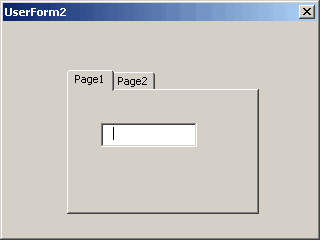
Then switch pages without putting anything in the TextBox
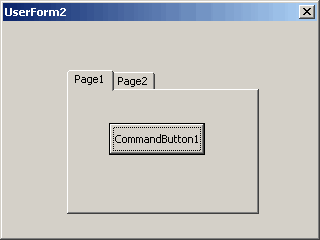
It’s on Page1, but the contents of Page2 are showing. Strange. Here’s what I have for a workaround, but it’s not very pretty. In a standard module, put this
Public Sub chMultiVal()

    UserForm1.MultiPage1.Value = 0

End Sub
and change the Change event to this
Private Sub MultiPage1_Change()
If Len(Me.TextBox1.Text) = 0 Then
Application.OnTime Now + TimeSerial(0, 0, 0), “ChMultiVal”
End If
End Sub
I’m not sure if this is a bug or not, but, in VBA, you can choose the Application.WorksheetFunctions.VLookup function. However, when trying to use it, it returns the Run-Time Error 4004 – Unable to get the VLookup property of the Worksheetfunction class.
Assuming Sue is trying to prevent selection of Page 2 until the textbox on Page 1 contains some text you could try this alternative code.
Private Sub MultiPage1_Click(ByVal Index As Long)
If Len(Me.TextBox1.Text) = 0 Then
Me.MultiPage1.Value = 0
End If
End Sub
Dick, this works great and I appreciate it so much…thanks for taking the time out…I am going to send this link to others that I know are having the same problem…Sue
Andrew,
I don’t think that’s a bug. But, if you use Application.Vlookup instead, it doesn’t create an error like that, it just returns the xlErrNa error.
Sorry, I meant Andy, not Andrew…
Speaking of bugs… I was just curious: since you’re an MVP, do you have the authority/status/ability to report bugs to Microsoft and have them actually pay attention?
Andy: We have a contact person (called a Lead) at Microsoft to whom we can report bugs. I don’t think we get any special treatment though. The only benefit that I’ve ever seen is that she reads the messages and frankly I wouldn’t know where else to submit them. I looked around microsoft.com for a bug submission page, but came up empty.
I have been trying to solve this issue for the past week and this solution ROCKS. Thank you for posting the solution to this issue. Do you know the reason behind this issue or what causing it.
Thank you
Nitin: I don’t know the cause. Even if MS let me see the code for Excel, I guarantee I wouldn’t understand it.
You’re a friggin’ genius! I’ve been pulling out what little hair I have left for two days over this one. BTW, this wasn’t a bug in Excel 2000, but cropped up in XP and 2003.
Way to think outside the box!
Thank you, thank you, thank you.
This bug still seesm to be around in Excel 2007. I’m so grateful to have found this page.
I have been struggling with this problem for over a week now.
All of the code I wrote using Excel 2000 suddenly fell over when I “Up”graded to Excel 2003…
I used Andy Pope’s suggestion of using the click event instead of the change event and its all working again.
I can only guess that its an intentional fix in Excel 2003, preventing people from writing code which changes the multipage value, which is triggered by the multipage_change() event.
I suppose its conceivable that the code could fall into the chain of:
multipage_change() -> multipage.value = X -> multipage_change() -> multipage.value = X -> …
And maybe theres something in Excel 2003 preventing this from happening.
Anyway, my problem is fixed.
Surfed in here today, and I appreciate the help very much. Great work around — thank you very much for a solution to my problem!! More proof that Microsoft does not always have all the answers!
Thank you again,
Alan
This tip is great and I can kind of re-work my user form to use this command and achievce what I need. Thankyou.
However, ideally I would like to set the second page of my form only to be enabled when a certain check box on the first page is checked. Have tried a few things but no sucess. I’m very new to VBA so possibly I am making an ameteuristic mistake.
Thanks in Advance for any help.
Hi All,
I recently discovered this website whilst looking for another issue and I have been going through all your posts from when the site was first started back in 2004.
I have never used the MultiPage control on any form and decided to give this a try.
I have created the Userform as requested and when I click the button it moves to a blank page 2, even if the textbox is empty?
I tried Andy Pope’s suggestion but that did the same thing? Have I missed something here?
This was my solution:
Private Sub cmdNext_Click()
If Len(Me.TextBox1.Text) = 0 Then
Me.MultiPage1.Value = 0
Else
Me.MultiPage1.Value = Me.MultiPage1.Value + 1
End If
End Sub
This may not be the proper way to move between the pages, so any pointers, suggestions will be gladly welcome!
After so many years this problem still persist.
Sorry Sue, the workaround did not work for me.
Hi all. I ran into this exact problem (using Excel 2010), and after trying about 20 different ways to fix it, I stumbled across a way that works really well.
The problem is mainly that while the MultiPage_Change event code is running, changing pages doesn’t work right, so the page change needs to take place completely outside of the MultiPage_Change event code.
Furthermore, when you click on the tab for the new page, the MultiPage_Change event is immediately queued and can’t be cancelled as far as I can tell, so you have to have code that changes the page back after the MultiPage_Change event occurs.
My work-around utilizes the MouseUp event, and gives the user the option to change pages or return to the previously active page. It would be very simple to instead condition the change on some value.
First, you need to declare an integer or long variable and a boolean variable at the top of the userform code (outside of any subs) so that they are global to the UserForm:
Dim previousPage As Integer
Dim EventsDisabled As Boolean
Also be sure to have global variables corresponding any values that you might change in the MultiPage_Change code so that you can restore them to their original values if you have to change the page back to the previous value. As I write this I realize that any code in the MultiPage_Change event could be moved to the MouseUp event, and conditioned on the current page being different from the previous page (thus avoiding the need to restore previous values), but I’ll continue with describing what I have done.
Include the following in the UserForm_Initialize event code:
Sheet1.Activate
Me.MultiPage1.Value = 0
previousPage = 0
EventsDisabled = False
In the first line of the MultiPage_Change code put:
If EventsDisabled Then Exit Sub
In the MultiPage_MouseUp event code put this:
If Me.MultiPage1.Value previousPage
EventsDisabled = True
response = MsgBox(“Are you sure that you want to change pages?”, vbYesNo)
If response = 6 Then ‘ 6 for yes, 7 for no
previousPage = Me.MultiPage1.Value
Else
Me.MultiPage1.Value = previousPage
‘code to restore any changes made in the MultiPage_Change event code
End If
EventsDisabled = False
End If
And that’s it!
Hopefully future people with tis problem will be able to find this thread easier than I did.
@David: Your approach sounded promising, but unfortunately the MultiPage1.Value property doesn’t update before the MouseUp event is completed so Me.MultiPage1.Value will always be equal to the previousPage. I’m assuming there is a typo in your code and you meant to say:
In the MultiPage_MouseUp event code put this:
If Me.MultiPage1.Value previousPage Then