Custom Document Properties are a good place to store information about a workbook to use in your code. In this example, an IsInvoice property is created in a workbook to identify it. An add-in is used to create a toolbar and if a workbook is activated that needs that toolbar, to make the toolbar visible.
Under File>Properties, go to the Custom tab
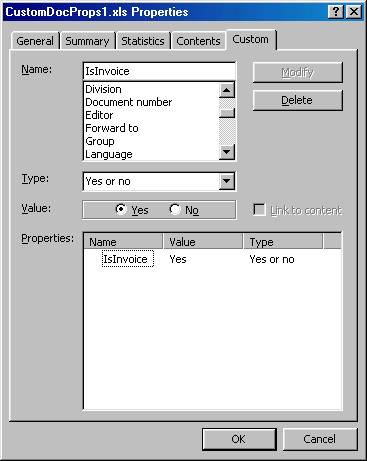
Now the add-in can look for this property to determine whether it should make the commandbar visible. I’ve set up a couple of constants in a standard module to identify the commandbar name and the property name:
Public Const gsG702 As String = “G702”
In a class module, I’ve created some application level events to show and hide the commandbar based on the existence of the custom property:
Dim bIsInvoice As Boolean
On Error Resume Next
bIsInvoice = Wb.CustomDocumentProperties(gsISINVOICE).Value
On Error GoTo 0
If bIsInvoice Then
Application.CommandBars(gsG702).Visible = True
End If
End Sub
Private Sub xlApp_WindowDeactivate(ByVal Wb As Workbook, ByVal Wn As Window)
On Error Resume Next
Application.CommandBars(gsG702).Visible = False
On Error GoTo 0
End Sub
I tend to use the Activate and Deactivate events instead of Open and BeforeClose. I like it because it keeps the commandbar visible in context, not just when any workbook is active.
Do you know what the size limitations (bytes) are on custom document properties? Per property and total for all cdp’s. I have heard 64K (including all hyperlinks) but have no authoritative reference.
Thanx,
Tom
Is there a way to access a custom document property while the target file is still closed, or do you have to open the file with vb before it can be read?
By the way, I LOVE THIS SITE!!!!
Set objPropReader = CreateObject(“dsolefile.propertyreader”)
Can set props with file shut, don’t even need excel/word to do it.